We may earn a commission when you buy through links on this page, at no extra cost to you. How this works.
Load-cell handbrakes generate forces between 60 and 150 kilograms during hard braking, and standard desk clamps are not designed to handle that load without flexing or loosening. The sensor inside a load-cell handbrake measures the force you apply with precision, but any movement in the mounting system introduces slop that ruins feel and consistency. A secure hard-mounting solution keeps the handbrake locked in place under peak force, so every input reads accurately and the desk stays stable.
Most desk clamps sold for sim racing are rated for wheels or shifters that produce far less torque. When you apply full force to a load-cell handbrake, plastic threads strip, thin steel bends, and rubber pads compress unevenly. The result is a handbrake that tilts, rotates, or vibrates during use. Four attributes separate working mounts from failures: clamp capacity in kilograms, compatibility with desk thickness, material rigidity across the bracket and fastener, and whether the installation can be reversed without permanent modification.
Clamp capacity should match or exceed the peak force rating of your handbrake. A 100-kilogram load-cell model needs a mount rated for at least 100 kilograms of vertical or lateral load, with a safety margin for repeated stress cycles. Desk thickness compatibility matters because thicker desks require longer bolts and deeper clamp jaws, while thinner desks need smaller contact areas to distribute pressure without cracking the surface. Material rigidity depends on steel or aluminum construction with no plastic in the load path; composite clamps flex under sustained force and lose preload over weeks of use. Installation reversibility is important if you share the desk or need to relocate the handbrake, so bolted clamps with protective pads are preferable to solutions that drill into the desk or leave adhesive residue.
Lightweight plastic clamps and adhesive mounting plates are excluded from consideration because they cannot maintain preload under the cyclic forces a load-cell handbrake produces. Plastic threads deform, and adhesive bonds fail when shear forces exceed the rated peel strength of the tape or epoxy. The solutions that work use through-bolts, steel clamp jaws, and wide contact patches that spread force across the desk surface.
Understanding the Forces: Why Standard Clamps Fail Under Load-Cell Operation
Load-cell handbrakes generate substantial rearward force during hard braking inputs, often exceeding 90 kilograms of pull at maximum sensor compression. This force travels through the mounting hardware and into the desk surface, creating both shear stress along the clamp face and a levering moment that attempts to rotate the entire assembly backward. Standard desktop clamps designed for monitor arms or task lights typically use thin stamped steel or plastic bodies with shallow throat depths under 40 millimeters, which flex visibly under sustained heavy loads and allow the handbrake to rock or shift mid-session.
Desk material plays a critical role in how mounting force distributes across the contact area. Solid wood or plywood desktops 18 millimeters thick or more resist compression and distribute clamping pressure evenly, while particleboard or honeycomb-core surfaces can crush locally under high point loads, creating permanent indentations that reduce clamp grip over time. Metal desktops offer the highest rigidity but require rubber or polymer pads to prevent scratching and maintain friction between clamp and surface.
Contact area between the clamp pad and desk directly affects how much force can transfer without material failure. A clamp with a 50-millimeter-wide pad spreads the same load across more than double the surface area of a 30-millimeter pad, reducing localized stress and improving stability during repeated high-force braking. Throat depth determines how far the clamp can reach over the desk edge and how much mechanical advantage the clamp screw can apply; shallow clamps lose leverage quickly and require frequent retightening as vibration and thermal expansion loosen the connection.
Mounting solutions that combine deep throat geometry, wide contact pads, and rigid steel or aluminum construction minimize flex and maintain alignment under the repetitive shock loads typical of rally or drift-style sim racing, where handbrake engagement happens dozens of times per session with little time for the mount to settle between inputs.
Installation Tips for a Flex-Free Experience
Getting your load-cell handbrake mount completely rigid starts with the right clamping sequence. Begin by positioning the clamp or bracket at your desired location, then finger-tighten all bolts evenly before applying full torque. This prevents uneven pressure that can warp desk surfaces or create slight gaps that turn into flex under load. For most aluminum clamps, 3-5 Nm of torque is sufficient; over-tightening risks cracking laminate or compressing particle board beyond its structural limit.
Check for zero flex by gripping the handbrake firmly and attempting to rock it side-to-side and front-to-back. Any movement at the mount point will amplify during hard pulls and degrade the precision your load cell delivers. If you detect play, loosen the bolts slightly, reposition the clamp to ensure full contact with the desk edge, and re-tighten in a cross pattern. Rubber or silicone pads between the clamp jaws and desk surface distribute pressure more evenly and prevent marring on finished wood or glossy surfaces, though they may introduce minimal compliance on very thin desktops.
Route your handbrake cable with enough slack to avoid tension on the USB or sensor connector during use. Secure the cable to the underside of the desk with adhesive clips or velcro straps, leaving a small service loop near the handbrake body to absorb any accidental tugs. Strain on the connection can cause intermittent signal dropouts or, in worst cases, internal solder joint failure. If your mount places the handbrake far from your PC, consider a cable tie anchor point midway along the run to prevent the weight of the cable from pulling on the handbrake port. A final check after your first session confirms nothing has shifted under real pulling forces.
Choosing the Right Mount for Your Desk and Handbrake
Selecting a hard-mounting solution starts with three variables: whether you own or rent the desk, the maximum force rating of your handbrake, and how often you plan to reconfigure your rig. Clamp-based solutions offer speed and reversibility but transfer stress to desk edges and surfaces, making them best for desks you can't drill and handbrakes under 100 kg of maximum force. Bolt-through mounts provide superior rigidity and load distribution across the desk structure, which matters when you're using a high-force load-cell handbrake that can exceed 120 kg during aggressive inputs.
If you rent your space or share a desk for work and sim racing, prioritize clamps with wide contact pads and non-slip liners to minimize surface damage and avoid permanent modification. Adjustable clamp mounts add flexibility for different desk thicknesses and positions, though they typically cost more and introduce additional pivot points that may require periodic retightening. For dedicated sim racing desks or custom cockpit builds, bolt-through solutions eliminate flex and allow you to anchor the handbrake precisely where your natural hand position falls during cornering.
Price and adjustability move together: fixed-position bolt plates cost less and deliver maximum stiffness, while multi-axis adjustable mounts let you fine-tune angle and reach at the expense of added hardware and potential micro-movement under load. Match the mount's load rating to your handbrake's specification sheet, and confirm that clamp depth or bolt spacing aligns with your desk's actual thickness and internal structure. A mount rated for 30 mm clamp depth won't secure properly on a 40 mm butcher-block desk, and a bolt pattern designed for aluminum extrusion won't work with solid wood without custom drilling.
What to Consider Before You Buy: Desk Material, Thickness, and Handbrake Compatibility
- Measure your desk thickness to confirm clamp throat capacity
- Verify desk material can handle clamp compression without damage
- Check handbrake mounting hole pattern against mount plate dimensions
- Confirm available clearance under desk for clamp mechanism
- Assess whether desk is dedicated sim rig or shared workspace
- Verify handbrake force rating matches mount load capacity
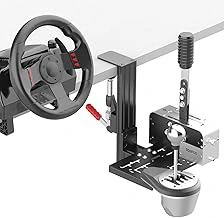
wuutyty Universal Desk Mount for Racing Simulator Shifters & Handbrakes
The wuutyty Universal Desk Mount offers a straightforward clamp-based solution for attaching load-cell handbrakes to desk edges without drilling. The mount uses a two-piece clamp design that grips the desk from above and below, with an adjustable screw mechanism to tighten against varying desk thicknesses. While the manufacturer does not publish exact throat depth or maximum thickness specifications, user reports indicate compatibility with desks up to approximately the listed size thick, which covers most standard gaming and office desks.
The mounting plate provides multiple threaded holes arranged in a standard pattern, allowing installation of handbrakes with different bolt spacings. This adjustability makes the mount compatible with most load-cell handbrake models that use M6 or M8 mounting hardware. The plate itself appears to be constructed from steel, offering adequate rigidity to resist flex during high-force braking inputs, though the exact gauge is not specified.
Installation requires no permanent modification to the desk. You position the clamp at the desired location, align the mounting plate, and tighten the adjustment screw until the clamp holds firmly. The process typically takes five to ten minutes and requires only a hex key or Allen wrench, depending on your handbrake's fasteners. The clamp works best on desks with smooth, flat edges; desks with rounded edges or thick protective coatings may reduce grip stability.
One consideration is desk surface protection. The clamp's contact points can mark softer wood or laminate finishes over time, especially when subjected to repeated heavy braking forces. Adding thin rubber or felt pads between the clamp and desk surface helps distribute pressure and prevent damage. The mount's stability depends significantly on desk construction - solid wood or metal-framed desks provide better resistance to movement than particleboard or hollow-core designs.
At $49.99, the wuutyty mount sits in the mid-range for desk clamp solutions. It delivers reliable hold for typical sim racing use without requiring tools beyond what you likely already own. The universal mounting plate expands compatibility across handbrake brands, though you should verify your specific handbrake's bolt pattern before purchase. For desks within the supported thickness range and users who want to avoid permanent installation, this mount provides a functional balance of accessibility and holding strength.
Check current price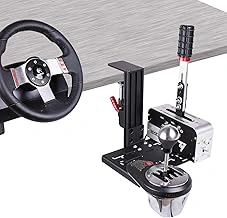
YAARHEJ Heavy-Duty Sim Racing Desk Mount for Shifters & Handbrakes
The YAARHEJ Heavy-Duty Sim Racing Desk Mount offers a straightforward clamp-based solution for securing shifters and handbrakes to desks without permanent modification. Priced at $48.99, this mount uses a C-clamp design that presses against both the top and underside of a desk surface, creating friction-based stability suitable for moderate-force peripherals.
Build quality centers on metal construction, though the exact gauge and alloy are not specified in the product details. The clamping mechanism applies vertical pressure across a contact plate, which spreads load forces over a wider area than single-point clamps. This distribution helps reduce desk surface compression and improves grip under lateral forces typical of handbrake pulls.
Desk thickness capacity and maximum clamp opening are not documented in the verified specifications, so users working with thicker gaming desks or countertops should confirm fitment before purchase. The mount includes a reinforced plate designed to accept standard bolt-pattern accessories, providing flexibility for different handbrake and shifter models that use M6 or M8 mounting hardware.
When compared to lighter clamp designs, this mount's heavier construction suggests better resistance to movement during high-force inputs. However, without published weight capacity or torque ratings, it remains difficult to quantify performance with high-preload load-cell handbrakes that generate sustained pull forces above multiple kg. Users should ensure the clamp is tightened fully and periodically check for any play that develops over time, particularly if the desk surface is softer wood or particleboard.
The mount's 4.5-star rating reflects general user satisfaction, though individual results will depend on desk material, clamp tightness, and the force profile of the attached handbrake. For load-cell units with lower force settings or desks with solid hardwood or metal surfaces, this mount provides a balance of affordability and rigidity without requiring drilling.
- ✅ Metal construction with reinforced mounting plate
- ✅ C-clamp design spreads contact pressure across desk surface
- ✅ Compatible with standard bolt-pattern shifters and handbrakes
- ✅ No permanent desk modification required
- ⚠️ Desk thickness capacity not specified
- ⚠️ Weight and torque limits not documented
- ⚠️ Performance depends on desk material and clamp tightness
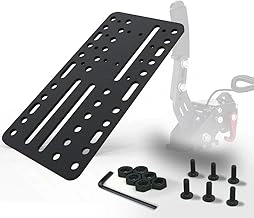
USB Racing Game Handbrake Sim for PC G25/27/29 T500
This USB handbrake combines a basic analog sensor with an integrated desk clamp, making it a single-purchase option for sim racers who need both the brake handle and mounting hardware together. The clamp fits desks up to approximately the listed size thick and uses a simple screw-tightened mechanism to secure the unit in place. Unlike the dedicated load-cell handbrakes discussed elsewhere in this guide, this model uses a potentiometer sensor that registers travel distance rather than applied force, which changes the feel and precision during use.
The construction is compact and lightweight, suited to smaller desk spaces where a full standalone load-cell unit and separate mounting bracket would consume too much real estate. Compatibility is listed for Logitech G25, G27, G29, and Thrustmaster T500 ecosystems, though the USB connection means it functions as a generic game controller axis on PC rather than integrating directly into those wheel bases. At $13.99, this represents the budget end of the handbrake market, with the integrated clamp eliminating the need to source separate mounting hardware.
Because the sensor measures lever position instead of pressure, the resistance curve feels closer to a mechanical cable handbrake than a hydraulic load-cell unit. Users accustomed to load-cell precision will notice less granular control in the mid-range of pull force. The clamp itself holds adequately for the lighter forces this unit generates, but it lacks the rigid overbuild you'd find in dedicated hard-mount solutions designed to handle 50+ kg of pull. Installation involves tightening a single thumbscrew to compress the clamp jaws against the desk edge - no drilling, no additional brackets, and no alignment jigs required.
This handbrake works best for casual sim racers on a tight budget who prioritize convenience and minimal setup over the tactile accuracy of a true load-cell system. If your desk space is limited and you want a handbrake that arrives ready to clamp and play, the integrated design saves time and avoids compatibility puzzles between separate brake and mount products. For users planning to upgrade to a load-cell handbrake later, keep in mind that this unit's clamp is built into the handbrake body, so you cannot reuse the mounting hardware with a different brake model.
- ✅ Integrated clamp and handbrake in one unit eliminates separate mounting purchases
- ✅ Compact footprint suits smaller desk spaces
- ✅ Simple thumbscrew clamp installs without tools or drilling
- ✅ Budget-friendly at $13.99 with USB plug-and-play setup
- ⚠️ Potentiometer sensor offers less precision than load-cell alternatives
- ⚠️ Clamp design cannot be reused if upgrading to a different handbrake
- ⚠️ Lower force capacity compared to dedicated load-cell units
- ⚠️ Compatibility references specific wheel models but functions as generic USB controller
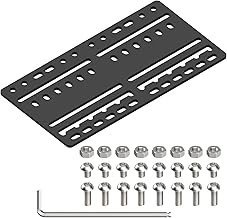
JOYORAN Sim Racing Bracket Plate for Shifters and Handbrakes
When clamps and suction plates fall short, drilling through your desk becomes the only path to zero movement under high load-cell forces. The JOYORAN Sim Racing Bracket Plate gives you that option through a flat steel design with multiple bolt-through mounting points, intended for permanent installation on dedicated sim racing surfaces.
The plate measures roughly the listed size by the listed size and features a grid of holes sized for M6 and M8 bolts. You drill matching holes in your desk, pass bolts through both the bracket and desktop, then secure with washers and nuts underneath. This creates a mechanical anchor that reduces flex entirely - no compression zones, no pivot points, just metal bolted to wood or composite material. The result is a handbrake mount that stays locked in place even when you apply maximum braking force mid-corner.
Installation requires planning and commitment. You'll need a drill, appropriately sized bits for your chosen bolt diameter, and access to the underside of your desk for hardware tightening. Mark your hole positions carefully; mistakes are permanent. Desk thickness matters: particleboard under three-quarters of an inch may split or compress around the bolt holes over time, while solid hardwood or plywood provides better long-term stability. The bracket includes slotted mounting holes for shifter or handbrake attachment, compatible with most standard bolt patterns found on Thrustmaster, Logitech, and aftermarket load-cell units.
The tradeoff is irreversibility. Once you drill, your desk carries those holes forever. This makes the JOYORAN plate ideal for a purpose-built sim rig desk or a workbench dedicated to racing hardware, but a poor choice for shared workspaces, rental apartments, or any surface you might want to repurpose later. If you race on a dining table that doubles as office space, a G-clamp solution preserves flexibility. If you've committed to a permanent racing station and want the highest possible rigidity, bolt-through mounting delivers.
At $21.99, the JOYORAN bracket costs less than many adjustable clamp systems but shifts expense to your desk itself. The plate works as a universal adapter: mount it once, then swap handbrakes or shifters without re-drilling, as long as the new device shares a compatible bolt pattern. Stability rivals cockpit-grade aluminum extrusion mounts, provided your desk material holds up under bolt tension.
Choose this bracket when you've decided your desk will serve racing hardware indefinitely and clamp compliance bothers you during hard braking inputs. Skip it if you need tool-free removal or plan to move your setup between locations.
Check current price