We may earn a commission when you buy through links on this page, at no extra cost to you. How this works.
Most sim racing cockpits either lack a dedicated monitor mount or create clearance conflicts with desk-clamp solutions, leaving triple-screen setups to rely on free-standing monitor stands. A well-designed free-standing triple monitor stand eliminates the need to drill into walls or depend on desk edge geometry, giving you stable VESA mounts that can be positioned independently of your rig's frame or furniture.
The central problem these stands address is alignment precision across three displays, typically 27 to 32 inches, without introducing sway or tilt drift during aggressive inputs. Free-standing designs also let you reposition the entire array when you move your cockpit or reconfigure your space, something fixed mounts cannot offer.
The tradeoff is straightforward: you gain structural independence and placement flexibility, but you accept a larger floor or desk footprint and typically a higher upfront cost than single-monitor arms or basic clamp mounts. Stands with wider bases and thicker steel tubing reduce flex but demand more room, while lighter aluminum frames save space at the cost of rigidity under larger or heavier panels.
This guide compares five free-standing VESA monitor stands built to handle the width, weight, and angular adjustment demands of triple-screen sim racing, focusing on how each balances stability, footprint, and ease of fine-tuning angle and depth for proper screen alignment.
Quick comparison
| VIVO Quad Freestanding Monitor Stand STAND-V004TG | Check current price |
| VIVO Triple Monitor Freestanding Desk Stand STAND-V003FG | Check current price |
| monTEK Freestanding Dual Monitor Stand for 17-32 inch Screens | Check current price |
Use the matching tool first
Start with Direct Drive Torque Translator if you want to narrow the fit before checking current offers.
How to Achieve Perfect Triple Screen Alignment and FOV Geometry
Achieving accurate triple-screen alignment in sim racing starts with measuring the distance from your seated eye position to the center screen, typically between 24 and 36 inches depending on monitor size and cockpit depth. Use this measurement in a FOV calculator - such as the tools built into iRacing, Assetto Corsa Competizione, or third-party utilities like Pixel Density Calculator - to determine the correct horizontal angle for your side monitors, usually between 30 and 50 degrees depending on screen size and viewing distance.
Position the center monitor first, adjusting height so the middle of the display sits at eye level when you're seated in your normal driving position. This baseline prevents neck strain during longer sessions and keeps the virtual horizon aligned naturally. Once the center screen is locked, angle each side monitor inward so the inside bezel aligns as closely as possible with the outer edge of the center screen, minimizing the visual gap.
Check bezel-to-bezel spacing on both sides; even a few millimeters of difference between left and right creates a noticeable asymmetry in your peripheral vision. Verify that all three screens share the same height and tilt angle - mismatched tilt throws off the sense of a continuous image and makes it harder to judge corner entry. After physical alignment, enter the exact angle and distance measurements into your sim's FOV settings to ensure the rendered perspective matches your real-world geometry.
Tighten every adjustment point on the stand once alignment is finalized. Loose joints allow micro-movement from desk vibrations or force feedback, gradually shifting angle or height over time. Run a test session and watch for any visual discontinuity at the bezels during fast panning; if the image appears to "jump" between screens, recheck both the physical angle and in-game FOV values. Proper alignment makes the bezels fade into the this product, turning three separate displays into a single, cohesive field of view that improves spatial awareness and consistency on track.
Free-Standing vs. Desk-Mounted vs. Cockpit-Integrated: When to Choose Each
Choosing the right mounting architecture starts with understanding how your cockpit, desk, and workspace interact - and which constraints matter most in your setup.
Free-standing monitor stands deliver the cleanest separation between your racing cockpit and your desk. They plant their own footprint on the floor, which means your screens move with your rig rather than staying anchored to furniture. This independence makes repositioning straightforward: slide the cockpit forward for more legroom or angle it toward a window without fighting desk-clamp geometry. The tradeoff is floor space. A triple-monitor stand typically occupies 24 to 36 inches of depth behind your seat, and that footprint stays committed even when the rig sits idle. If your room doubles as an office or shared space, that dedicated zone may compete with other furniture.
Desk-mounted clamp arms and poles conserve floor space by borrowing support from your existing desk. For setups where the cockpit sits directly in front of a sturdy workbench, clamps keep the area behind your seat open and avoid the visual bulk of a standing base. The limitation surfaces when your cockpit needs to move independently. Desk clamps fix screen position relative to the furniture, so shifting your seat forward or rotating the rig even slightly pulls monitors out of alignment. Cable management also becomes messier when your racing station and productivity desk share the same mount, and desk edges must be accessible and thick enough - usually 0.75 to 3 inches - to accept the clamp hardware.
Cockpit-integrated mounting welds or bolts monitor brackets directly to your rig's frame, creating a single rigid unit. Screens stay perfectly locked relative to your seating position no matter where you roll the cockpit, and there's no separate base to stabilize or desk to reinforce. This approach maximizes structural stiffness and simplifies cable routing, since everything travels through the same extrusion channels. The cost is flexibility. Swapping cockpits, adjusting screen height independently, or temporarily removing monitors for transport requires disassembly. Integrated mounts also assume your rig uses 80/20 aluminum extrusion or a similar modular frame with mounting points; they won't work with basic seat-and-wheelbase setups that lack structural rails.
Your decision hinges on three factors. If your cockpit and desk occupy different zones or you rearrange frequently, free-standing bases offer the mobility and independence that clamps and integrated brackets can't match. If floor space is tight and your cockpit parks against a deep, stable desk, clamp arms make sense - provided you accept fixed screen geometry. If you race on a full extrusion rig and prize rigidity over reconfiguration, cockpit-integrated brackets eliminate the base entirely and keep every adjustment tied to your seating reference point.
Final Recommendation: Match Stand Architecture to Your Cockpit and Screen Plan
If you're running 32-inch curved displays and need absolute rigidity during high-force steering and braking inputs, the Anman Triple Monitor Mount Stand delivers the strongest base stability and minimal flex under load. Its welded steel construction and wide footprint make it the best choice when zero wobble is non-negotiable and desk space permits.
For setups that may evolve - swapping monitor sizes, adjusting angles frequently, or testing different bezel-gap configurations - the VIVO Desk Mount TS03F offers the widest range of height, tilt, and swivel adjustment. You trade some ultimate rigidity for flexibility, but the toolless articulation and VESA compatibility up to 200 × 200 mm make it easier to dial in alignment as your rig changes.
When budget is the primary constraint and you're working with standard 27-inch flat panels, the VIVO V003FG provides a stable, no-frills triple stand at the lowest entry cost. It won't accommodate larger or heavier screens as confidently, and fine-tuning bezel gaps requires more effort, but it delivers functional alignment for lighter builds without the premium price.
Match your stand to your screen weight, cockpit footprint, and how often you'll adjust positioning. Heavy curved monitors demand stiffer frames; lighter flat panels tolerate simpler designs. Choose based on your actual display specs and space, not on aspirational flexibility you won't use.
What to Look for in a Free-Standing Sim Racing Monitor Stand
- VESA compatibility: 75×75 mm and 100×100 mm minimum for most 27 - 32 inch panels
- Weight capacity per arm: 15 - 20 lbs for large curved gaming monitors
- Base footprint: width and depth impact cockpit clearance and floor space
- Pole rigidity: tube diameter and material thickness reduce screen wobble during aggressive inputs
- Tilt and swivel range: independent angle control for proper FOV convergence
- Cable management: routing clips or channels to prevent snag on wheel rotation
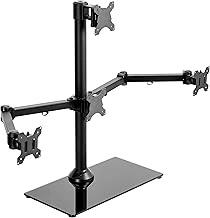
VIVO Quad Freestanding Monitor Stand STAND-V004TG
If your sim rig needs room for a fourth display - whether for telemetry overlays, track maps, or racing apps - the VIVO STAND-V004TG offers four independent VESA mounts on a single free-standing frame. Each arm adjusts vertically and tilts to accommodate mixed screen sizes or a dedicated top-center monitor for auxiliary data without requiring separate desk space or wall drilling.
The quad configuration spreads load across a wider steel base than triple-only designs, which increases footprint but improves stability when all four positions are populated. Weight distribution remains even as long as monitors stay within the per-arm limit, and the frame handles larger panels comfortably in a three-across, one-above layout. Cable routing channels run along each vertical pole to keep power and display cables out of sight.
At $99.99, the V004TG costs roughly the same as dedicated triple stands but adds the fourth mount as a built-in expansion path. The tradeoff is assembly complexity - four arms mean more hardware and longer setup time - and a footprint that extends several inches deeper to balance the upper monitor. If you know you'll need dash software visible above your main view, the extra mount slot reduces the need for a separate clamp or pole later. If you're committed to three screens only, simpler triple frames save desk depth and setup effort.
Arm positioning is less granular than ball-joint systems; each mount adjusts in fixed increments, so fine-tuning bezel gaps across all four screens requires patience and occasional spacer washers. Once locked, the frame holds alignment through extended sessions, and the open structure keeps airflow unobstructed around each display.
- ✅ Four independent VESA mounts for triple racing view plus auxiliary display
- ✅ Even weight distribution across wider steel base
- ✅ Built-in cable routing along vertical poles
- ✅ Comparable price to triple-only stands with expansion flexibility
- ⚠️ Larger footprint required to balance four-monitor load
- ⚠️ Fixed-increment arm adjustment complicates precise bezel alignment
- ⚠️ Longer assembly time with four sets of mounting hardware
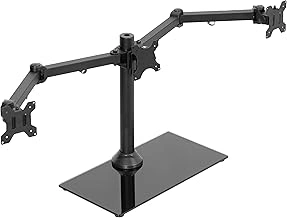
VIVO Triple Monitor Freestanding Desk Stand STAND-V003FG
The VIVO STAND-V003FG delivers triple-monitor capability at $79.99, making it the most budget-friendly option in this comparison. This free-standing stand fits three screens up to the listed size, each weighing up to the listed size, and uses standard multiple×the listed size or multiple×the listed size VESA patterns. The pricing reflects a simpler design: fixed-height poles, basic tilt adjustment, and a narrower stance than the Hex or WALI models.
Build quality is functional rather than premium. The steel frame holds flat panels securely for casual sim racing, but the lighter gauge tubing and smaller base footprint mean less natural damping when you shift in your seat or bump the desk. Screens larger than the listed size will overhang the mount plates and may introduce sway during spirited driving. Curved monitors are not officially supported, and the shallow bracket design leaves little room for adapter plates.
Adjustability is limited to tilt on each arm - no independent swivel or height change per screen. You set the angle once during assembly and typically leave it. For users running three identical larger flat displays in a static cockpit, this simplicity speeds setup and keeps the price low. If you need to dial in precise convergence angles or accommodate mixed screen sizes, the fixed architecture becomes restrictive.
Cable management consists of plastic clips on the poles. They work for bundling DisplayPort and power runs, but expect visible cabling unless you add your own sleeves. The compact base - narrower than competing stands - fits smaller desks yet sacrifices stability when monitors are angled wide. Anchoring the stand to the desk or placing weight on the base plate improves rigidity.
Ideal for newcomers testing triple-screen sim racing with standard multiplep or multiplep larger flat panels, the V003FG offers a low entry cost and straightforward assembly. Enthusiasts planning to upgrade to larger curved screens, run heavy ultrawide side monitors, or frequently reposition displays will outgrow the fixed geometry and lighter frame quickly. For a permanent, budget-conscious setup with modest screens, it covers the essentials without the refinement of higher-priced alternatives.
- ✅ $79.99 price point - lowest in the category
- ✅ Supports three 27-inch monitors up to 22 lbs each
- ✅ Compact base footprint fits smaller desks
- ✅ Simple assembly with fixed-height poles
- ⚠️ Limited to tilt adjustment; no per-screen swivel or height change
- ⚠️ Lighter frame and narrower base reduce stability under load
- ⚠️ Not designed for curved or 32-inch+ displays
- ⚠️ Basic cable clips leave runs more visible
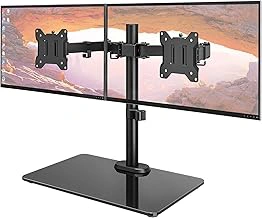
monTEK Freestanding Dual Monitor Stand for 17-32 inch Screens
Sim racers working with limited floor space or those running a dual ultrawide configuration will find the monTEK Freestanding Dual Monitor Stand a practical alternative to full triple-screen towers. Designed for the listed size displays, this stand delivers two independent VESA mount positions on a single vertical pole, and its compact base footprint lets you fit a racing setup into tighter corners or shared rooms without the lateral sprawl of a triple stand.
At $69.99, the per-mount cost is notably lower than most triple alternatives, making it an efficient choice if you plan to pair two larger ultrawides or two standard larger panels side by side. The vertical pole design keeps cables out of the way and allows independent height adjustment for each screen, which helps when you want to stack displays or angle them asymmetrically for a wrap-around field of view. The 4.8-star rating suggests stable performance within its two-screen envelope, and users report predictable assembly with standard hex tools.
The tradeoff is obvious: you give up the third screen and the preset angular guides that triple stands provide for side-monitor toe-in. If your cockpit is narrow or you prefer the immersive stretch of dual ultrawides over three standard panels, the smaller base and lower price offset the missing mount. For racers who need three screens or plan to expand later, this stand will require a second unit or an upgrade. Measure your desk depth and cockpit width before committing - dual setups work best when you can position monitors close enough to maintain peripheral continuity without forcing extreme neck rotation.
Check current price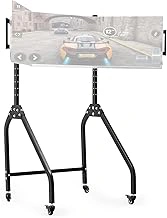
Anman Triple Monitor Stand for Racing Simulator Cockpit 27-32 Inch
Structural rigidity separates casual monitor arms from purpose-built sim racing stands, and the Anman Triple Monitor Stand delivers the weight capacity and footprint needed to hold three 27-32 inch displays without flex during hard cornering inputs. Unlike articulating desk mounts that drift under repeated force, this free-standing design anchors around the cockpit frame with a heavy-duty base that keeps alignment stable across long sessions.
The stand supports screens up to the listed size per mount with individual angle adjustment on each arm, letting you dial in the precise convergence angle for peripheral vision without eyestrain. The base sits wide enough to straddle most bucket seats and extends rearward to distribute weight behind the driver position, preventing forward tilt even when all three monitors lean inward. VESA multiplexmultiple and multiplexmultiple compatibility covers the majority of gaming monitors in this size range.
At $129.99, the price-to-rigidity ratio favors users who want one stable platform rather than three separate arms that require constant realignment. The tradeoff is footprint: the stand occupies more floor space than clamped articulating mounts and does not fold for storage. Height adjustment range is narrower than premium modular rigs, so confirm your seated eye level matches the fixed vertical span before committing. Cable management requires zip ties or sleeves since the frame lacks integrated routing channels.
This stand works best in dedicated sim spaces where the cockpit stays assembled and the monitors remain mounted. If you swap between racing and desktop work, lighter articulating arms offer more flexibility. For triple-screen immersion that stays locked in place, the Anman provides the structural foundation without the cost of aluminum extrusion rigs.
Check current price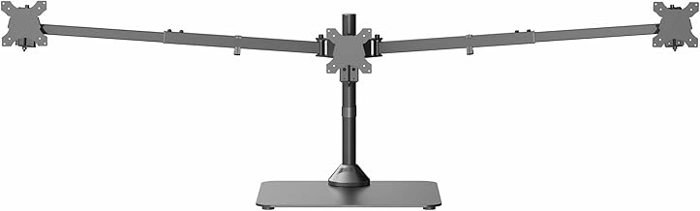
VIVO Freestanding Triple Monitor Desk Mount STAND-TS03F
Users who anticipate swapping monitors or shifting between landscape and portrait configurations need more articulation than a fixed-geometry stand provides. The VIVO Freestanding Triple Monitor Desk Mount STAND-TS03F uses independent swivel, tilt, and rotation arms on all three VESA mounts, letting you dial in angles for curved or mismatched displays without permanent hardware changes.
Each arm adjusts for height along the vertical pole, so you can stagger monitors or align them evenly at eye level. Tilt and swivel joints give enough range to correct slight viewing-angle errors that appear during long sessions, particularly when seats shift or display bezels reflect overhead lighting. Rotation capability means the outer screens can flip to portrait if you use the rig for work or streaming between races.
That flexibility costs assembly time. You'll calibrate three separate arms instead of locking monitors into preset slots, and each joint adds a potential wobble point under aggressive steering inputs. The freestanding base measures wide enough to remain stable when all three screens extend forward, but you sacrifice desk depth compared to a welded truss design. Tightening every articulation bolt ensures rigidity, yet periodic checks become routine if you adjust frequently.
The stand accommodates multiple-to-larger monitors up to the listed size each, covering most sim racing panel sizes without adapter plates. Cable routing clips attach to each arm, keeping power and DisplayPort lines clear of the adjustment hardware. At $119.99, the STAND-TS03F trades the simplicity of fixed-angle stands for adaptability across monitor generations and mounting scenarios.
- ✅ Independent tilt, swivel, and rotation on all three arms
- ✅ Height adjustment along the pole for custom alignment
- ✅ Supports 13-to-32-inch monitors up to 22 pounds each
- ✅ Cable routing clips on each arm
- ⚠️ Longer assembly and calibration than fixed-geometry stands
- ⚠️ Multiple articulation joints require periodic tightening
- ⚠️ Wider footprint sacrifices desk depth when arms extend forward