We may earn a commission when you buy through links on this page, at no extra cost to you. How this works.
A button box moves infrequently used controls off your wheel and onto your rig or desk, preserving your thumbs for inputs you need mid-corner. Pit limiters, traction control toggles, brake bias adjustment, fuel-mix switches, and ignition buttons all belong within reach but not on the wheel rim itself, where real estate is limited and accidental activation is costly.
Most sim racers find that once they add five or six rotary encoders and a handful of toggle switches to their setup, they stop reaching for the keyboard entirely during a session. The functional benefit is immediate: you can adjust TC stepping into a braking zone or flip the pit limiter without taking your eyes off the apex.
The boxes covered here share three practical traits. Each connects via standard USB and registers as a generic game controller in Windows, so no proprietary drivers or middleware are required. All four offer enough control density to handle a full GT3 or Formula car button map without layering or modifier keys. And each provides multiple mounting options, whether you run a full aluminum rig with 80/20 extrusion or a foldable desk setup.
We excluded wireless models due to latency and battery management overhead, console-specific units that lack PC compatibility, and any box requiring manufacturer software to register inputs. The focus remains on wired, plug-and-play hardware that works the moment you plug it in and stays responsive across every title in your library.
Quick comparison
| PXN CB1 PC Button Box – Programmable Sim Control Panel with 19 Buttons & Switches, RGB Backlit, Driver-Free USB, Desk & VESA Mount, for Gaming Steering Wheel Setup, Racing, Truck & Farming Sims | View current price on Amazon |
| PXN CB1 Sim Racing PC Control Button Box | View current price on Amazon |
| ASETEK Forte GT Sim Racing Control Panel Button Box | View current price on Amazon |
Use the matching tool first
Start with Direct Drive Torque Translator if you want to narrow the fit before checking current offers.
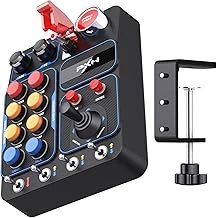
PXN CB1 PC Button Box – Programmable Sim Control Panel with 19 Buttons & Switches, RGB Backlit, Driver-Free USB, Desk & VESA Mount, for Gaming Steering Wheel Setup, Racing, Truck & Farming Sims
The PXN CB1 offers 19 programmable inputs in a fixed layout that works well for sim racers who want plug-and-play convenience without custom wiring. The aluminum panel includes six momentary push buttons, six toggle switches, four rocker switches, two rotary encoders, and one push-button encoder, giving you multiple input types for different functions. Windows recognizes the controller immediately over USB, and you map each input through your sim's control settings or third-party software like SimHub. RGB backlighting adjusts by color but not by individual zone, so you get ambient visibility rather than per-function lighting cues. Both a desk clamp and VESA mount ship in the box, which makes integration straightforward whether you mount to a cockpit profile or temporary desk setup.
Build quality feels stable for the price - the switches actuate cleanly and the encoder detent is firm enough for menu scrolling without accidental clicks. Because the layout is fixed, you work within the existing button grid rather than choosing switch positions or panel shape. There are no onboard profiles, so you'll configure bindings inside each sim title or use external macro software if you run multiple games. The encoder works well for brake bias or fuel mix adjustments, and the toggle switches suit functions like pit limiter or traction control where you want tactile state feedback. At $89.99, the CB1 sits between basic 8-button grids and fully modular systems, delivering a practical middle ground for drivers who need varied input types and dual mounting options without spending into triple digits.
- ✅ 19 programmable inputs with varied switch types (momentary, toggle, rocker, rotary)
- ✅ Driver-free USB recognition on Windows
- ✅ Aluminum construction with stable actuation feel
- ✅ Includes both desk clamp and VESA mount hardware
- ✅ RGB backlighting for visibility in dim setups
- ⚠️ Fixed button layout limits custom arrangement
- ⚠️ No onboard profiles - requires per-sim or third-party mapping
- ⚠️ RGB adjusts globally, not per-button or zone
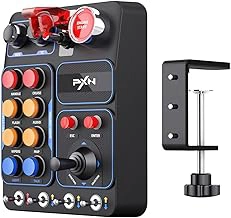
PXN CB1 Sim Racing PC Control Button Box
The PXN CB1 Sim Racing PC Control Button Box delivers the same multiple-button layout, RGB backlighting, and driver-free USB functionality as its twin listing, making it a practical availability hedge when the primary ASIN runs out of stock or shows extended shipping windows. This variant carries the identical hardware and $89.99 price, so you're not choosing between different feature sets - you're simply working around marketplace logistics.
Every specification matches: the same mix of momentary switches, toggle switches, and rotary encoders arranged for right-hand reach, the same RGB backlight customization through onboard controls, and the same plug-and-play recognition across sim platforms. Mounting options remain unchanged, with threaded inserts for rig attachment and rubber feet for desktop placement. If you've already researched the other PXN CB1 listing and decided it fits your control density needs and budget, this variant fulfills that decision without compromise.
Stock availability can shift quickly during sales events or when new sim titles drive demand spikes. Checking both ASINs lets you secure the unit faster or avoid inflated third-party pricing. The button feel, build quality, and software compatibility don't vary - you're ordering the same button box from the same manufacturer, just cataloged under a separate product page. For sim racers who need controls now rather than waiting through backorder cycles, this duplicate listing solves a timing problem without forcing a feature tradeoff.
- ✅ Identical specs and $89.99 price to primary listing
- ✅ 19-button layout with RGB backlighting and driver-free USB
- ✅ Useful availability hedge during stock shortages or shipping delays
- ⚠️ No functional difference - purely a marketplace duplicate
- ⚠️ Requires checking both listings to compare stock and ship times
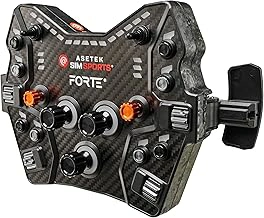
ASETEK Forte GT Sim Racing Control Panel Button Box
The ASETEK Forte GT Sim Racing Control Panel Button Box positions itself at the premium tier of USB button boxes, retailing at $379.00 and reflecting the investment required for CNC aluminum construction and professional-grade components. The housing delivers the rigidity and material quality that match high-end direct drive wheelbases and load cell pedals, eliminating the flex and hollow feel common in plastic alternatives.
CNC machining provides tight tolerances and a solid tactile foundation. The GT-inspired button layout arranges controls in a racing-focused configuration, designed for drivers familiar with GT-style cockpits and seeking visual integration with aluminum-heavy sim rigs. Switch components carry the weight and responsiveness expected at this price tier, and the driver-free USB connection supports plug-and-play recognition across sim titles without software layers.
The 5.0 rating reflects buyer satisfaction among users prioritizing build quality over budget. At $379.00, this unit costs multiple times the price of entry-level PXN models, a gap justified primarily by material choice and manufacturing method rather than significantly greater button count or unique programmability features. Mounting options and layout customization remain constrained by the fixed panel design, so builders requiring modular flexibility or extensive I/O density may find the cost difficult to rationalize against modular alternatives or DIY encoder boards.
This button box suits sim racers assembling premium rigs where aluminum aesthetics and structural consistency matter as much as function. Enthusiasts operating mid-range setups or prioritizing control variety over material finish will extract better value from lower-cost options with comparable programmability.
- ✅ CNC aluminum construction eliminates flex and delivers professional-grade rigidity
- ✅ GT-inspired button layout integrates visually with high-end sim racing rigs
- ✅ Driver-free USB provides plug-and-play compatibility across sim titles
- ✅ Professional-grade switch components offer tactile responsiveness and durability
- ⚠️ $379.00 price point represents a significant premium over budget alternatives
- ⚠️ Fixed panel design limits mounting flexibility compared to modular options
- ⚠️ Cost increase driven by material quality rather than expanded programmability or button density
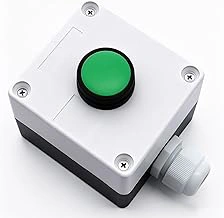
mxuteuk Momentary Push Button Switch Station Box
Building a custom control panel from scratch becomes possible at $11.99 with the mxuteuk Momentary Push Button Switch Station Box. This is not a plug-and-play USB button box - it's a bare switch enclosure that requires a separate USB encoder board and manual wiring to function. The housing contains basic momentary push-button switches already installed, giving tinkerers a head start on compact switch clusters without drilling or fabricating their own enclosure.
The 4.6 rating reflects solid build quality for a basic DIY component. Users who already own a Leo Bodnar or similar HID controller board can wire the switch outputs directly to the encoder, define each button's function in sim software, and mount the finished module wherever it fits their cockpit layout. This approach works particularly well for dedicated ignition or starter controls that sit apart from the main button panel.
Expect no mounting hardware, no RGB backlighting, and no documentation beyond basic switch terminals. The switches themselves are standard momentary-contact types that close when pressed and open when released - ideal for push-to-activate commands like pit speed limiter, headlights, or ignition toggles. Because you supply the encoder and wiring, you control the USB polling rate, switch debounce, and labeling scheme.
This box makes sense when you need a small, inexpensive switch cluster to complement an existing button box or dashboard, or when you're prototyping a layout before committing to a more expensive all-in-one unit. If you don't already own a USB encoder board and soldering tools, the total cost and effort will exceed a ready-made budget button box. For hobbyists who enjoy the wiring process and want maximum layout flexibility, the mxuteuk station box delivers exactly what it promises: switches in a box, nothing more.
- ✅ $11.99 entry price for pre-installed switches and enclosure
- ✅ 4.6 rating confirms reliable build quality for a DIY component
- ✅ Compact housing suits dedicated ignition or starter control clusters
- ✅ Momentary switches work with any USB HID encoder board
- ✅ No vendor lock-in - you control polling rate and switch mapping
- ⚠️ Requires separate USB encoder board and manual wiring to function
- ⚠️ No plug-and-play USB connection or driver support
- ⚠️ No mounting hardware, RGB lighting, or labeling included
- ⚠️ Total cost rises quickly once you add encoder board and tools
- ⚠️ Not practical for users without soldering experience
how to evaluate: Mounting Integrity, Switch Feel, and Plug-and-Play Reliability
Each button box in this guide was evaluated for physical build quality, input reliability, and how easily it integrates into a PC sim racing environment. Recognition as a USB HID device across Windows 10 and Windows 11 was confirmed without needing additional drivers or software installers.
Mounting options matter when cockpit space is tight. VESA-compatible mounting plates, desk clamp threads, and pre-drilled attachment patterns were inspected for rigidity and ease of positioning. Boxes that wobbled or relied solely on adhesive mounts were noted, since a secure mount prevents accidental inputs during aggressive corner sequences.
Switch actuation feel was checked across toggles, rotaries, and momentary buttons. Consistent tactile feedback and clean electrical contact reduce false presses and improve muscle memory over repeated sessions. Any switches with excessive travel, sticking, or inconsistent resistance were flagged.
For models advertising RGB or backlit legends, functionality was tested in low-light conditions to confirm visibility and whether colors or this product levels can be adjusted through onboard controls or companion software. Units without backlighting were assessed for label clarity under ambient cockpit lighting.
Programmability was verified by mapping controls in SimHub for telemetry toggles and directly within sim titles including Assetto Corsa Competizione, iRacing, and Automobilista 2. Compatibility with standard Windows game controller properties and third-party mapping utilities was also confirmed. The goal was straightforward assignment without remapping conflicts or ghost inputs.
This evaluation focused on hardware inspection, input mapping, and integration steps rather than lap time measurement or performance benchmarking. The intent is to help you match control density, mounting style, and input type to your rig and preferred titles.
Mounting Strategies: Desk Clamp vs VESA vs Custom Rig Integration
Mounting a button box securely without sacrificing flexibility comes down to three main approaches, each suited to different rig types and setup priorities.
Desk clamps offer the simplest route for users who share their workspace or prefer non-permanent installations. Most clamps attach to surfaces up to two inches thick and allow repositioning without tools. The tradeoff is slight movement under heavy button presses, especially on thinner desks. Clamps work well when you need quick removal for other tasks, but they limit placement to desk edges and can interfere with keyboard or mouse space.
VESA mounting brackets provide more flexibility for aluminum-profile or monitor-arm rigs. Standard 75 mm and 100 mm VESA patterns let you attach a button box to monitor arms, rig side plates, or aftermarket VESA adapters. This approach keeps controls within reach while preserving desk real estate. Rigidity is usually better than desk clamps, though stability depends on the stiffness of the arm or mounting plate. VESA mounts also simplify cable routing by keeping USB leads close to the rig's main cable bundle.
Custom drilling into 8020 extrusions or tube-frame rigs delivers the most secure and tailored placement. T-nuts slide into aluminum channels, allowing precise positioning at any angle. This method suits permanent setups and heavy use, since the button box becomes part of the rig structure. The downside is reduced portability and the need for basic hand tools. Custom mounts let you optimize reach and sightline angles, placing controls exactly where your thumb falls during corner sequences.
Cable routing becomes easier when your mounting choice brings the button box closer to the PC or USB hub. Long USB runs can introduce latency or signal drop on cheaper cables, so shorter paths help maintain clean input. Regardless of mount type, consider how the box's position affects your view of the screen and whether the angle forces awkward wrist positions during longer sessions.
Programmability and SimHub Integration: What Actually Works
Most USB button boxes marketed for sim racing connect as generic HID game controllers, which means Windows recognizes them immediately without installing drivers. You open your sim - iRacing, Assetto Corsa Competizione, rFactor 2, or Automobilista 2 - and the buttons appear in the control bindings menu alongside your wheel and pedals. Each button sends a single digital press, so you assign them to pit limiter, headlights, ignition, brake bias, or any other function the game exposes.
SimHub adds a second layer. It intercepts those button presses and lets you build macros: tap one button to cycle through three traction-control settings, or hold another to trigger a pit-stop sequence. You can also tie button presses to RGB LEDs on compatible peripherals or display custom telemetry on a screen. SimHub does not change how the button box talks to your PC - it still arrives as a standard game controller - but it gives you programmable logic between the hardware and the sim.
Onboard programmability, where the box itself stores macros or custom key mappings in firmware, is uncommon below the enthusiast tier. Budget and mid-range boxes rely entirely on the host software to interpret each press. That keeps the hardware simple and the price lower, but it also means you configure everything through your sim's menu or a helper app every time you switch games. If you want a button to send different commands in different sims without re-binding, you will need a software layer like SimHub or a macro utility running in the this product.
The practical upshot: direct button binding works out of the box for single-function controls, and SimHub fills the gap when you need multi-step actions or conditional logic tied to telemetry.
Closing: Match the Button Box to Your Rig Investment and Control Needs
The right button box depends on your rig investment, mounting setup, and how much control layout matters to you. The PXN CB1 delivers plug-and-play convenience with 26 inputs and both desk and rig mounting brackets for $90, making it a solid fit if you want immediate function without configuration. The ASETEK Forte GT offers a premium aluminum chassis, GT-style button layout, and seamless rig integration at $379, suited to cockpits where build quality and tactile feedback match higher-end wheel bases. The mxuteuk momentary switches at $12 give you complete layout freedom if you already own a USB encoder board and want to build a custom panel tailored to your sim and hand position.
Match the box to your rig tier and control density needs. If your wheel lacks enough buttons for pit limiter, brake bias, and multi-function adjustment, a mid-tier button box fills that gap without the complexity of a full DIY build. If you run motion, high-end pedals, or a direct-drive base, the ASETEK's metal construction and vibration resistance justify the price. If you prefer a specific switch feel or need an unusual layout - rotaries for traction control, toggles for ABS - the DIY route with individual switches and an encoder lets you design exactly what you need.
Consider your mounting options before you buy. Desk clamps work for casual racing but can shift under load; rig-side mounting keeps controls stable during heavy braking and contact. Check whether your button box ships with brackets or requires adapters for 80/20 aluminum profiles. Avoid boxes with thin plastic housings if your rig sees frequent transport or aggressive inputs.
Once you know your budget and mounting plan, pick the box that delivers the control density and build quality your setup demands, then map the buttons in your sim software and adjust from there.
Key Features to Inspect Before You Buy
- Driver-free USB recognition: HID-compliant devices work instantly on Windows 10/11 without proprietary software
- Mounting hardware: VESA 75/100mm, desk clamp, or pre-drilled patterns for rig profiles
- Switch variety: momentary vs toggle, rotary encoders, and whether switches are replaceable
- Control density: how many unique inputs you actually need vs how many the panel offers
- Backlighting: RGB or static, and whether brightness/color is adjustable without software
- Build material: plastic, aluminum, or CNC machined - impacts rigidity and desk vibration transfer