We may earn a commission when you buy through links on this page, at no extra cost to you. How this works.
Triple monitor setups for sim racing demand structural rigidity that typical monitor arms cannot deliver. When you brake hard into a corner or feel the force feedback spike through your wheel, any flex in your monitor mounting translates to screen wobble that breaks immersion and causes eye strain during longer sessions.
Extruded aluminum changes the equation. Unlike stamped steel or tubular arms with multiple pivot joints, extruded profiles deliver a continuous, load-bearing structure with predictable deflection characteristics. The material resists torsional flex under the lateral forces generated by direct-drive wheels and motion platforms, maintaining screen alignment when consumer-grade articulating mounts would shake.
For triple screen configurations, the requirements go beyond single-monitor ergonomics. You need VESA 75 and 100 compatibility across all three mounting points, combined weight capacity above 45 pounds to handle three 27- or 32-inch displays, and a mounting method that integrates with your rig rather than relying on desk clamps that shift under load. Desk-mounted arms introduce a leverage problem: the further your screens extend from the clamp point, the more magnified any flex becomes.
Articulating arms with gas springs and ball joints work well for productivity setups where you adjust angle throughout the day. In a sim racing rig, those same joints become failure points. Each pivot adds compliance, and the spring mechanisms that make repositioning effortless also allow micro-movements under vibration. Extruded aluminum mounts eliminate those variables by using fixed-angle brackets or minimal-play adjustment mechanisms machined into the extrusion itself.
The exclusion criteria for this guide reflect the realities of high-force sim racing environments. We focus on mounts designed to bolt directly to aluminum extrusion rigs using T-slot hardware, with cross-sectional geometry thick enough to span 60 inches or more without center support. Weight ratings, VESA hole spacing, and cable management integration matter more here than height adjustment range or tool-free tilt. If your setup includes a motion platform or direct-drive wheel base above 15 Nm, the structural margin in extruded aluminum mounting is not optional.
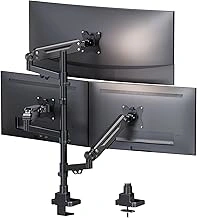
Heavy Duty Fully Adjustable Triple Monitor Mount for 35-inch Ultrawide Screens
Mounting three 35-inch ultrawide screens requires a monitor arm that can handle both the weight and the physical span without sagging or vibration. This heavy-duty triple monitor mount uses thick extruded aluminum arms and an extended VESA plate layout that spaces each screen far enough apart to maintain proper bezel alignment across a curved field of view. Each arm supports up to 35-inch ultrawides in landscape orientation, and the reinforced construction keeps flex to a minimum even when you adjust tilt or swivel mid-session.
The mount offers full articulation: tilt adjusts from -multiple° to +multiple°, swivel moves ±multiple°, and each arm extends or retracts along the horizontal rail to fine-tune depth and angle. VESA compatibility covers multiple × a larger amount and multiple × a larger amount patterns, so most ultrawide monitors will bolt directly to the plates. The rear mounting interface is designed to attach to multiple/multiple-style aluminum extrusion profiles or similar rig frames, making integration straightforward if you already run a sim racing cockpit or workstation built on modular rails.
Because the arms are spaced for 35-inch screens, smaller monitors - multiple-inch or multiple-inch panels - may leave noticeable gaps between bezels or require shims to achieve the tight wrap most triple-screen sim racers prefer. Desk-clamp mounting is not included; this unit assumes you have vertical extrusion or a custom frame to bolt into. The reinforced arm design adds enough rigidity that you can dial in your field-of-view angles once and leave them, but the extra material also means the mount occupies more vertical and horizontal space than lighter alternatives.
If you run 35-inch ultrawides and mount to a rig frame rather than a desk, the combination of weight capacity, VESA spacing, and extruded aluminum rigidity makes this mount a practical choice for zero-flex triple-screen setups.
- ✅ Reinforced extruded aluminum arms resist flex under 35-inch ultrawide loads
- ✅ Extended VESA plate spacing supports proper bezel alignment for curved field of view
- ✅ Full tilt, swivel, and depth adjustment on each arm
- ✅ Mounts directly to 80/20 or comparable extrusion profiles
- ⚠️ Arm spacing leaves gaps when used with smaller 27-inch or 32-inch monitors
- ⚠️ No desk-clamp hardware; requires rig frame or vertical extrusion
- ⚠️ Bulkier footprint than lighter single-arm designs
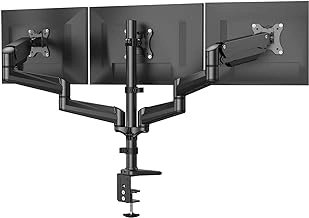
HUANUO Triple Gaming Monitor Desk Mount
The HUANUO Triple Gaming Monitor Desk Mount offers a practical solution when you need three-screen support without a dedicated rig frame. Its clamp mechanism attaches directly to desk edges between multiple and a larger amount thick, making it compatible with most office desks and gaming tables. Each arm supports monitors up to a larger amount and a larger amount, with standard multiple×a larger amount and multiple×a larger amount VESA mounting patterns.
The increased joint count - three articulation points per arm - provides freedom to adjust height, tilt, and rotation independently for each screen. That flexibility comes with a trade-off: under load, especially with heavier monitors pushed to maximum extension, the arms can introduce noticeable flex during intense racing sessions or when bumping the desk. Users with lighter multiple-inch screens or those who keep arms closer to the base report better stability.
Clamp strength is adequate for stationary setups, though repeated adjustments can loosen the grip over time. The desk-edge design keeps your workspace portable and doesn't require drilling or permanent modification, but it won't match the rigidity of mounts bolted directly to an aluminum rig frame. Cable management clips along each arm help control routing, though you'll still need to plan slack for full articulation.
For sim racers who alternate between racing and productivity, or renters who can't modify their space, this mount bridges the gap between single-monitor arms and dedicated cockpit hardware. Just verify your desk thickness and monitor weight before committing, and expect to tweak tightness after the first few sessions to minimize movement.
- ✅ Fits desk edges 0.4 to 3.9 inches thick without drilling
- ✅ Independent articulation for each screen up to 27 inches
- ✅ Standard 75×75 mm and 100×100 mm VESA compatibility
- ✅ Cable management clips integrated along arms
- ⚠️ Increased joint count can introduce flex under heavy loads
- ⚠️ Clamp may loosen with repeated adjustments
- ⚠️ Less rigid than mounts bolted to dedicated rig frames
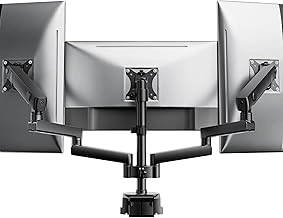
monTEK Heavy Duty Full Motion Triple Monitor Desk Stand for 13-27 inch Screens
Budget-conscious sim racers building their first triple-screen setup face a recurring question: can a freestanding desk mount deliver the rigidity of a clamped solution? The monTEK Heavy Duty Full Motion Triple Monitor Desk Stand arrives at $79.99 with an extruded aluminum frame and a weighted base designed to support three 13-27 inch monitors without drilling or clamping. For drivers running multiple-inch panels, this stand offers full tilt, swivel, and height adjustment at a price point significantly below premium rig-mounted alternatives.
The freestanding base design trades the absolute stability of a clamp mount for setup flexibility. You can position the array anywhere on your desk surface without edge access, and the weighted foot keeps the assembly upright during height adjustment. That said, the broader footprint consumes more desk real estate than a single-point clamp, and the stand's center of gravity shifts as you extend or tilt the monitors outward. Drivers who apply heavy pressure to their wheel base may notice more sympathetic motion in the screens compared to a clamped or rig-bolted mount, particularly if the monitors sit at or near the 27-inch upper limit.
Material choice matters here. While the main posts use extruded aluminum, joint design and wall thickness differ from the heavier-gauge construction found in mounts twice the price. The arms provide adequate resistance to prevent monitor droop under static load, but full-motion hinges introduce more potential flex points than fixed or tilt-only designs. If you plan to adjust screen angle frequently or run larger 27-inch panels at the weight capacity ceiling, test the lock-down torque on each joint before your first race session.
The 13-27 inch range constraint suits most sim racing configurations, but it excludes the multiple-inch ultrawide trend and leaves little headroom for future upgrades. Pilots running three multiple-inch multiplep displays will find the weight capacity sufficient, while those considering 27-inch multiplep panels should verify individual monitor weight before purchase. The stand accommodates standard VESA multiple×a larger amount and multiple×a larger amount mounting patterns, covering the vast majority of gaming monitors in this size class.
At this price, the monTEK stand delivers functional triple-screen mounting for drivers prioritizing adjustability and portability over absolute zero-flex performance. You gain the freedom to dial in screen angle and height without permanent desk modification, accepting a trade-off in base footprint and minor flex under high wheel force. For a first build or temporary setup, the value proposition holds - just recognize that upgrading to a clamped or chassis-integrated mount will tighten stability if you later add a direct-drive wheel base or transition to heavier screens.
- ✅ Freestanding base requires no clamping or drilling
- ✅ Full tilt, swivel, and height adjustment for screen positioning
- ✅ Supports three 13-27 inch monitors with VESA 75×75 and 100×100 mm patterns
- ✅ $79.99 price point accessible for first-time triple-screen builds
- ⚠️ Larger desk footprint than clamp-mounted alternatives
- ⚠️ More potential flex under wheel force compared to clamped or rig-bolted mounts
- ⚠️ 27-inch upper limit restricts future upgrade path
- ⚠️ Full-motion hinges introduce additional articulation points versus fixed designs
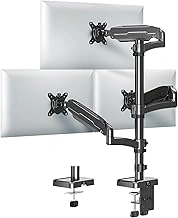
MOUNT PRO Triple Monitor Desk Mount for 32-inch Screens with Tilt & Swivel
When you're mounting three 32-inch flat panels, the joint mechanism determines whether your screens stay aligned or drift during a race. The MOUNT PRO Triple Monitor Desk Mount uses individual tilt and swivel arms for each screen, giving you the flexibility to fine-tune viewing angles without moving the entire assembly.
Each arm connects to the central spine with a dual-bolt lock system that clamps the joint after adjustment. This differs from friction-only designs that rely on spring tension - once you tighten the hex bolts, the screen position holds under typical desktop vibration. The swivel range lets you angle outer screens inward for an immersive cockpit view, while tilt adjustment compensates for desk height or chair position changes.
The desk clamp spans roughly a larger amount of contact area and uses a threaded post to compress against the underside of your desk. For three 32-inch screens, you're distributing significant weight across that single clamp point, so desk thickness and material matter. Solid wood or thick laminate desks handle the load without flex; thinner particleboard or hollow-core surfaces may show movement when you adjust a screen or bump the desk.
VESA mounting plates accommodate multiple×a larger amount and multiple×a larger amount patterns, covering most 32-inch monitors. The arm spacing on the central spine is fixed, so screens with unusually wide bezels or non-standard stand attachment points may create small gaps or require spacers. If your monitors have rear protrusions - like external power bricks or non-flush VESA mounts - check that the arm depth provides enough clearance before the screen backs touch.
At $79.99, this mount prioritizes angle adjustment over depth or height travel. There's no gas-spring extension, so once installed, the screens stay at a fixed distance from the desk edge. That works well for dedicated sim rigs where you set the position once, but it's less ideal if you frequently switch between racing and productivity layouts. The tilt and swivel joints do add a small amount of play compared to fully welded arms, but the bolt-lock design keeps that movement minimal once everything is snugged down.
Screen size limits aren't specified in the product details, but the arm length and spacing suggest a practical lower limit around a larger amount - smaller screens may leave visible gaps between panels or require custom spacing solutions. For 32-inch displays in a fixed triple setup, the adjustable joints and straightforward clamp installation make this a flexible option as long as your desk can support the concentrated load.
- ✅ Dual-bolt joint locks hold tilt and swivel positions without drift
- ✅ Swivel range allows angled outer screens for immersive setups
- ✅ VESA 75×75 mm and 100×100 mm compatibility covers most 32-inch monitors
- ✅ Straightforward desk clamp installation
- ⚠️ Single clamp point concentrates weight - requires solid desk material
- ⚠️ No depth or height adjustment after installation
- ⚠️ Fixed arm spacing may create gaps with unusually wide bezels
- ⚠️ Bolt-lock joints add slight play compared to welded designs
What Causes Monitor Flex in Triple Screen Rigs
Triple monitor flex begins the moment your direct-drive wheelbase delivers high-torque feedback through the rig. Each screen acts as a lever arm, multiplying the force applied at the mount base. When you slam the brakes at 12 Nm in a sim racing session, the forward momentum of three 27-inch displays creates cantilever loading that stamped steel brackets simply cannot resist without bending.
Vibration travels from the wheel deck through every connection point. Thin-wall tubing and folded sheet metal amplify these oscillations instead of dampening them. The result is visible screen shake during aggressive inputs, ruining immersion and making it harder to hit apex markers consistently.
Resonance amplification occurs when the natural frequency of your mount structure matches the frequency of steering corrections. Lightweight stamped mounts with multiple pivot joints create weak points where flexion concentrates. You will see the outer monitors sway independently, lagging behind chassis movement.
Extruded aluminum profiles solve this by distributing load across a continuous cross-section. Wall thickness and internal geometry determine stiffness far more than raw weight. A 40x80mm T-slot extrusion with 3mm walls resists bending through its moment of inertia, keeping the entire structure rigid under the same forces that buckle tubular designs.
The difference shows up most during trail braking and rapid direction changes. Stamped mounts may hold position when static, but dynamic loading during actual racing reveals their limits. Extruded aluminum maintains alignment because the material and geometry work together to prevent deflection at every joint and span.
Integrated Rig Mounts vs. Desk Clamps: Which Is Right for Your Setup?
Choosing between a rig-integrated mount and a desk clamp comes down to how your workspace is built and whether you prioritize absolute rigidity or flexibility. Rig-integrated mounts fasten directly to extruded aluminum profiles using T-slot nuts and bolts, creating a single continuous structure that eliminates independent wobble. Because the monitors share the same frame as your wheel base and pedals, inputs transfer less vibration to the screens, and adjustments stay locked under high-force steering. Desk clamps, by contrast, grip the edge of a desk or table and rely on compression and friction to stay secure. They work well on solid-core desks and allow you to reclaim desk space when you slide the arm back, but any movement in the desk surface or clamp joint propagates to the monitors.
Footprint and portability also differ. A rig-mounted solution occupies dedicated floor space and usually stays in one spot, but it keeps your desk clear for keyboard work or other tasks. Desk clamps save floor space and make it easier to relocate your setup, though thick desks or desks with modesty panels can limit clamp reach and stability. If your desk has a laminate or veneer surface, padding the clamp contact points prevents marring, and periodic re-tightening is often needed as desk materials settle under load.
Future upgrade plans matter. If you plan to add a motion platform, button box extensions, or hydraulic pedals to your rig, an integrated mount grows with your extrusion frame using the same T-slot system. Desk clamps require separate mounting hardware for each new component, and weight limits become a concern. On the other hand, if you share your workspace or want the option to swap between gaming and productivity layouts quickly, a desk clamp offers that modularity without disassembling frame sections.
Evaluate your current desk thickness, surface material, and whether you already own or plan to build an extrusion-based rig. Rig mounts deliver the highest rigidity and cleanest cable routing, while desk clamps provide flexibility and preserve desk real estate when zero-flex performance is less critical.
Final Recommendations: Matching Monitor Mount to Screen Size and Rig Type
Screen size and rig configuration determine which extruded aluminum mount will deliver zero-flex performance in your setup. A 24-inch triple setup requires less cantilever strength than 32-inch displays, and a desk clamp behaves differently than a direct rig mount under the same load.
The Sim-Lab Triple Monitor Stand works across the widest range of screen sizes, from 24 to 32 inches, thanks to its extruded beam construction and independent VESA plate adjustments. It suits both desk-mounted and dedicated rig installations, though the 80/20-style frame integrates cleanly with aluminum profile cockpits. If you run 27-inch or larger monitors and want independent tilt per screen, this is the most versatile choice.
For compact 24-inch setups or sim racers working within a smaller footprint, the Trak Racer Triple Screen Mount provides stable support with a smaller mounting base. Its fixed-angle design reduces adjustment complexity but limits fine-tuning for mixed-size displays or angled cockpit positions.
Rigmetal's offerings split by mounting preference: the desk-clamp variant suits multi-use spaces where the rig shares a workstation, while the direct-mount version integrates with 40×40 or 40×80 extrusion frames. Both handle 27-inch screens comfortably but approach their cantilever limits with 32-inch ultrawides. Check the stated weight capacity against your combined monitor load, including arms and VESA adapters.
Desk-only setups benefit most from clamp or grommet mounts that preserve surface space and allow repositioning. Dedicated rigs gain rigidity from direct-bolt connections to the frame extrusion, eliminating desk flex entirely. If your rig uses 80/20 or equivalent profile, confirm the mount's t-slot compatibility and bolt pattern before ordering.
Measure your monitor widths, VESA hole spacing, and cockpit or desk depth before selecting a mount. Add 10 - 15 cm to your total screen width to account for bezel gaps and adjustment brackets. This prevents last-minute adapter purchases and ensures your chosen mount can position all three displays within your field of view without obstruction.
Key Buying Considerations: VESA Patterns, Adjustability, and Footprint
- Verify VESA 75 or VESA 100 compatibility with your specific monitor models before purchase
- Measure your desk thickness or rig extrusion profile dimensions to confirm clamp or mounting bracket fit
- Calculate total screen weight and compare to per-arm weight capacity, not total mount capacity
- Check whether tilt and swivel ranges meet your field-of-view angle requirements for sim racing
- Consider cable routing: some mounts include integrated clips or channels that reduce desk clutter
- Confirm whether the mount supports portrait orientation if you plan mixed-orientation setups