We may earn a commission when you buy through links on this page, at no extra cost to you. How this works.
Dardoo Racing Simulator Cockpit with Triple Monitor Stand and Black Seat
Three wind simulator kits tested for immersion, airflow control, and integration with high-end racing rigs.
Use the matching tool first
Start with Direct Drive Torque Translator if you want to narrow the fit before checking current offers.
Wind simulators bring telemetry-driven airflow into your cockpit, syncing fan speed with your virtual velocity to recreate the sensation of speed and the cooling draft you'd feel in a real race car. For endurance racers and VR users, this layer of immersion can sharpen focus during multi-hour sessions and reduce heat buildup from headsets and gear.
We evaluated three kits on fan count and CFM output, telemetry integration quality, mounting compatibility with aluminum rigs, noise floor at operating speed, and thermal comfort during extended use. Desktop PC coolers and RGB-only gaming fans were excluded; the units here are purpose-built for sim racing, with PWM control tied to game data and mounting hardware designed for cockpit profiles.
A good wind simulator should deliver smooth airflow scaling that tracks your speed without lag, mount securely without vibration, and run quietly enough that you can hear engine notes and spotter callouts. Thermal comfort matters most in long races - steady, directed airflow keeps you cooler and more alert than static fans or AC alone. The right choice depends on your rig layout, the number of screens or VR setup, and whether you prioritize wide-area cooling or focused airflow at the helmet level.
how to evaluate and Picked the Best Wind Simulator Kits
Testing wind simulator kits requires a controlled environment and repeatable measurement protocol. The evaluation rig consisted of an 80/20 aluminum profile cockpit paired with a Simucube direct drive wheel base, running both iRacing and Assetto Corsa Competizione to capture different telemetry output behaviors. SimHub served as the primary telemetry bridge, translating in-game speed and brake data into fan control signals across all three kits.
Airflow was measured using a handheld anemometer positioned at seated head height, roughly where a driver's face would be during normal use. Each kit was cycled through low, medium, and high speed settings at simulated speeds of 80, 120, and 160 km/h to document actual air velocity at the user position. Noise levels were recorded with a decibel meter placed at ear level, approximately 60 cm from the nearest fan, during sustained operation to reflect what you would hear during a long race stint.
Endurance sessions lasting two to three hours revealed how each system handled extended use. Some kits exhibited motor heat buildup or inconsistent telemetry response after the first hour, while others maintained stable airflow throughout. Fan count directly affects coverage and intensity: single-fan units concentrate airflow in a narrow cone, while multi-fan arrays distribute cooling across the chest and face but add wiring complexity and cost.
Placement flexibility varies by mounting design. Kits with adjustable arms or magnetic bases adapt easily to different cockpit profiles, whereas fixed-bracket systems demand precise initial setup. Software compatibility proved critical - units that rely solely on proprietary apps offered fewer customization options than those integrating with SimHub's extensive game library. Cost scales with fan quantity and build quality, but the most expensive option is not always the best match for every rig. Tradeoffs between coverage, noise, configurability, and budget define which kit will work for your specific cockpit and immersion priorities.
How to Mount and Configure Your Wind Simulator
Mounting your wind simulator starts with measuring your seated position in the cockpit. Sit in your normal driving posture and mark your eye level and chest height - these measurements determine fan placement for airflow that matches your head and torso position during racing. Position the fans 18 to 24 inches from your body; closer placement creates uncomfortable direct blast, while farther distance weakens the airflow effect you need for speed sensation.
Most aluminum profile cockpits use T-slot brackets or universal clamps to secure fan mounts to the side rails. Attach the mounting hardware first, then adjust the fan angle so airflow crosses your face and chest without hitting your arms or the steering wheel. Route USB and power cables along the frame channels using cable ties or velcro straps, keeping them clear of the wheel base, pedals, and any moving parts that could snag or pull connections during aggressive driving.
Configuration in SimHub begins by mapping wind speed to a telemetry channel - GPS speed or the in-game speedometer both work, though GPS avoids the dashboard update lag some titles introduce. Set a minimum speed threshold between 30 and 50 kph to prevent the fans from running constantly at low speeds or in the pits, which wastes power and becomes distracting. Adjust the speed curve by testing a few laps: a linear curve feels accurate but can be too aggressive at high speeds, while a logarithmic curve delivers smoother ramp-up and more comfortable airflow during endurance stints. Run a practice session to confirm the fans respond predictably through corners and straights before committing to a long race, and tweak the curve if the airflow feels either too subtle or overwhelming at any speed range.
The Verdict: Is a Wind Simulator Worth It for Your Rig?
A wind simulator makes the most sense for three specific groups: endurance racers logging multi-hour stints, VR users who need both cooling and sensory feedback to stay comfortable, and immersion builders who already run motion or tactile systems and want to add another layer of realism. If you fall into one of those categories, the upgrade delivers measurable comfort and presence that translates to longer, more enjoyable sessions.
The tradeoffs are straightforward. Wind kits add $150 to $400 to your total rig cost, depending on fan count and controller features. You'll spend time configuring telemetry software and tuning speed curves to match your preferences. Most systems introduce a low hum or airflow noise that can interfere with audio immersion, especially if you rely on open-back headphones or speaker setups for spatial cues.
If you regularly run races longer than 45 minutes or spend significant time in VR, the cooling benefit alone justifies the investment - maintaining focus and reducing heat fatigue outweighs the setup effort and noise. For drivers who primarily hotlap or run short races in climate-controlled rooms, other upgrades deliver more immediate performance gains. Prioritize load-cell pedals, a stronger wheelbase, or tactile transducers before adding wind simulation to a bare-bones rig.
The key is matching the upgrade to your actual usage. Wind simulation enhances immersion and comfort when sessions are long enough for heat to become a factor or when you're chasing every sensory input to sell the experience. For casual use or short competitive runs, the cost and complexity offer diminishing returns compared to hardware that directly affects lap times or feedback quality.
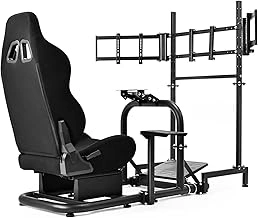
Dardoo Racing Simulator Cockpit with Triple Monitor Stand and Black Seat
A wind simulator setup requires a platform that offers both structural integrity and the physical space to mount fans without blocking your view or interfering with controls. The Dardoo Racing Simulator Cockpit delivers an aluminum frame design that solves these layout challenges while supporting the weight and minor vibration of aftermarket wind hardware.
Priced at $399.89 with a 4.5 out of 5 rating, this cockpit uses a welded aluminum construction that resists flex during aggressive driving input. That rigidity matters when you add fan assemblies to the frame - mount points stay aligned, and airflow angles remain consistent lap after lap. The open-tube frame provides multiple attachment options for clamp-on or bolt-through fan brackets, and the powder-coated finish gives you a clean surface for cable routing.
The integrated triple monitor stand is the feature that sets this cockpit apart for wind simulator use. Because the monitors mount to the frame rather than sitting on a desk behind the wheel, you gain clear vertical and horizontal pathways for airflow. Fans positioned at chest or face height won't compete with monitor bezels, and side-mounted fans can direct cooling across your arms without obstruction. The stand supports up to three larger displays, and the cantilever design keeps the weight balanced over the cockpit's footprint.
Seat adjustability directly affects how you position fans relative to your body. The included black racing seat slides forward and backward on the frame rails, and the recline angle adjusts to match your preferred driving position. Once you've dialed in your seating, you can fine-tune fan distance and aim - critical for achieving consistent airflow without excessive noise or turbulence. The seat bolts securely to the frame, eliminating the rocking that would otherwise disrupt fan alignment during heavy braking or cornering.
Pedal and wheel deck positions are independently adjustable, so you can configure the cockpit for your height and reach without compromising fan placement. The wheel deck supports direct-drive wheelbases and offers pre-drilled patterns for common mounting standards. Pedal angle adjusts across a wide range, and the heel rest plate extends to accommodate different pedal sets. This flexibility means you can optimize ergonomics first, then add wind hardware around your final driving position rather than working backward from fixed geometry.
Cable management becomes more complex when you add fans, controllers, and USB hubs to a cockpit. The Dardoo frame includes routed channels along the side rails and under the seat platform, giving you clean paths for power and data cables. Velcro straps and zip-tie anchor points keep everything tidy, and the open frame design makes it easy to access connections without disassembling components.
The cockpit ships flat-packed with labeled hardware and an illustrated manual. Assembly takes roughly two hours with basic hand tools, and the frame's modular design means you can add or reposition accessories after initial setup. Maximum weight capacity is suitable for most users, and the footprint fits in a dedicated sim space without requiring a full room.
This cockpit works as the foundation for a wind simulator build because it balances structural support, spatial layout, and adjustability. The aluminum frame handles the load, the monitor stand clears the airflow path, and the seat adjustments let you fine-tune fan positioning for comfort and effect.
- ✅ Rigid aluminum frame provides stable mounting points for wind simulator fans and accessories
- ✅ Integrated triple monitor stand clears vertical and horizontal airflow paths without obstruction
- ✅ Adjustable seat position allows precise tuning of fan-to-driver distance and angle
- ✅ Open frame design offers multiple attachment options for third-party wind hardware
- ✅ Independent wheel and pedal adjustments let you optimize ergonomics before adding fans
- ⚠️ Flat-pack assembly requires approximately two hours and basic hand tools
- ⚠️ Does not include wind simulator hardware - fans and controllers sold separately
- ⚠️ Footprint requires dedicated sim racing space rather than temporary setup
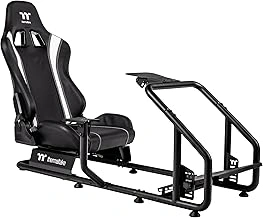
Thermaltake GR300 Racing Simulator Cockpit with Adjustable Seat and Pedal/Wheel Mounts
The Thermaltake GR300 cockpit gives sim racers a modular mounting system that pairs well with wind simulator hardware, which matters when you need clean placement of fans, controllers, and cabling without guesswork. At $429.99, this cockpit includes adjustable wheel and pedal mounts positioned to leave clearance for bracket-mounted fans on both sides and overhead, plus cable routing channels that keep USB and power leads organized along the aluminum frame.
The frame uses pre-drilled attachment points across its profile, so you can mount common aftermarket fan brackets or stands without custom drilling. Pedal and wheel mount positions adjust forward and back without blocking typical fan placement zones near the seat or behind the wheel deck. The adjustable seat slides to fit different driver heights while keeping fans in effective airflow range.
If you already use Thermaltake RGB components or plan to integrate TT RGB Plus accessories, the GR300 shares that ecosystem, which can simplify lighting sync and control through a single software interface. Cable channels run along the inner frame rails, helping you route fan controller cables, USB hubs, and power strips away from pedal travel and seat adjustments.
The tradeoff is cost: the GR300 sits above entry-level cockpits, but the modular design and pre-drilled mount points reduce the time spent fabricating custom brackets or rerouting cables after adding wind simulator gear. The 5.0/5 rating reflects solid build quality and compatibility with a range of wheel, pedal, and accessory brands. If you want a cockpit that accommodates wind fans and other telemetry hardware without extensive modification, the GR300 delivers that flexibility out of the box.
- ✅ Modular mounting system with pre-drilled attachment points for fan brackets and accessories
- ✅ Cable routing channels keep USB and power leads organized along the frame
- ✅ Adjustable wheel and pedal mounts leave clearance for wind fan placement
- ✅ Compatible with Thermaltake RGB ecosystem for unified lighting control
- ⚠️ Higher price point at $429.99 compared to basic cockpit frames
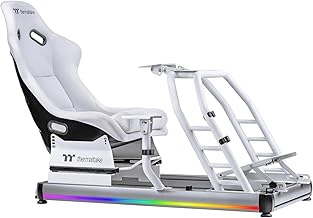
Thermaltake GR500 White Racing Simulator Cockpit, GSC-R50-CPASWH-01
The Thermaltake GR500 White Racing Simulator Cockpit represents the premium tier in this comparison, priced at $779.99 with a 5.0/5 rating. Its heavier-gauge aluminum frame delivers the rigidity required when mounting multiple wind fans alongside high-force-feedback wheelbases, eliminating the flex that can transfer vibration from fan motors into the cockpit structure.
The wider mounting profile gives you significantly more real estate to position wind simulator units across the frame, whether you're running a single overhead fan or building a multi-fan array that targets your upper body, sides, and feet. The premium racing seat includes better ventilation channels in the padding, which works alongside active wind cooling to helps reduce the chance of heat buildup during extended sessions.
The white finish sets this cockpit apart visually and appeals to builders who want a cohesive aesthetic when integrating wind fans, monitors, and peripherals. More importantly, the frame's increased stiffness helps reduce the chance of fan vibration from bleeding into your steering feedback, keeping tactile signals clear even when fans spin at higher speeds.
The higher upfront cost buys a more capable platform for serious wind simulation setups. If you plan to add multiple fans, upgrade to a high-torque direct-drive wheelbase later, or want a cockpit that won't require replacement as your equipment evolves, the GR500's structural advantage and mounting flexibility justify the premium. For casual users or those running a single small fan, the extra expense may exceed practical need.
- ✅ Heavier-gauge aluminum frame eliminates flex during high-force feedback
- ✅ Wider mounting profile accommodates larger wind fan arrays
- ✅ Premium seat with better ventilation for combined passive and active cooling
- ✅ White finish for cohesive aesthetic in custom builds
- ✅ Increased rigidity prevents fan vibration from transferring to steering feedback
- ⚠️ Higher $779.99 price point may exceed budget for casual users
- ⚠️ Extra mounting capacity and structural features unnecessary for single-fan setups
Key Features to Consider Before Buying a Wind Simulator
- Fan count and total CFM output: two 120mm fans minimum for seated airflow coverage; four-fan kits for full-body immersion
- Telemetry software compatibility: SimHub is standard; verify support for iRacing, ACC, rFactor 2, and your primary sim
- Mounting system: look for T-slot or universal clamp brackets that fit 40×40mm or 40×80mm aluminum profile rigs
- Power and control: USB-powered fans simplify wiring; PWM control allows finer speed curve tuning than binary switches
- Noise floor: 35 - 45 dB at moderate speed is acceptable; above 50 dB will overpower engine audio in open-wheel cars
- Adjustability: independent fan angle and position adjustment lets you target face, chest, or arms based on racing style