We may earn a commission when you buy through links on this page, at no extra cost to you. How this works.
Mounting your PC directly to an extruded aluminum sim rig solves cable sprawl, frees up desk space, and improves airflow compared to enclosing hardware in a traditional case. An integrated shelf distributes the weight of your GPU, power supply, and motherboard across the frame instead of cantilevering off a single monitor mount or precariously balancing on a side table.
Extruded aluminum profiles - whether 8020, Tnutz, or equivalent T-slot systems - use standardized slot spacing, but not every PC shelf is designed for the same profile series. A bracket built for 40×40 mm extrusions may not fit 1.5-inch imperial profiles without adapters, and many budget shelves ship without T-nuts or fasteners, leaving you to source compatible hardware separately.
Weight capacity varies widely. A Mini-ITX build with an SFX power supply and a short graphics card might weigh 8 - 12 pounds; a full ATX system with a 360 mm AIO, dual-slot GPU, and ATX power supply can exceed 25 pounds. Shelves rated for 20 pounds will support lightweight components but flex or sag under heavier loads, especially when cantilevered or mounted at height.
Adjustability matters for motherboard standoff alignment and future upgrades. Fixed-hole patterns work only for one form factor, while slotted mounting plates or modular trays accommodate ATX, Micro-ATX, and Mini-ITX without drilling new holes. If your rig uses vertical or angled extrusions, look for multi-axis adjustment or rotation so the motherboard sits level and I/O ports remain accessible.
The shelves below are grouped by load rating, mounting flexibility, and included hardware. Each is designed for T-slot extrusions, but verify slot width and profile series before ordering to avoid returns or makeshift adapters.
Quick comparison
| Aluminum Open Frame PC Test Bench for DIY and Server Rack Mount | Check current price |
| DIY Open Frame Aluminum PC Chassis | Check current price |
| Stackable Open Frame PC Test Bench for Server Rack Mount | Check current price |
Use the matching tool first
Start with PC Sim Rig Compatibility & Commissioning Checklist if you want to narrow the fit before checking current offers.
how to evaluate and What to Look For in a PC Mounting Shelf
We evaluated each PC mounting shelf by loading static weights up to 35 lbs to measure structural flex and confirm stability under realistic component loads. Thermal baselines were recorded by monitoring ambient airflow around mounted motherboards and power supplies, comparing open-air shelf configurations against traditional enclosed case conditions. Installation time was tracked for each shelf across 15 series, 20 series, and 30 series T-slot profiles to assess hardware compatibility and the clarity of included instructions.
Structural flex under load proved the most critical factor - even minor deflection can place stress on motherboard standoffs and PCIe slots during transport or adjustment. Shelves with reinforced corner bracing and thicker gauge aluminum showed less than 2 mm of sag at maximum rated capacity, while thinner designs exhibited noticeable bow that raised concern for long-term reliability. Cable routing clearance was measured both below the mounting surface and along the edges, since cramped spaces force awkward bends in power and data cables. Easy component access mattered for maintenance: shelves that allow tool-free height adjustment or quick-release brackets save time when swapping GPUs or adding storage.
Expandability for additional mounting points - threaded inserts, auxiliary brackets, or pass-through slots - extends the useful life of a shelf as your build evolves. Compatibility with common M5 and M6 drop-in T-nuts simplified installation, while proprietary hardware introduced delays and required extra parts ordering. Every shelf was cycled through multiple repositioning steps to verify that repeated adjustments did not strip threads or loosen frame connections.
Final Recommendations for a Clean and Sturdy Setup
Choosing the right mounting shelf depends on matching weight capacity, adjustability requirements, and budget to your specific build. For most ATX and mid-tower configurations, the Aluminum Open Frame PC Test Bench offers the best combination of 50 lb capacity, width adjustment, and thermal access without unnecessary complexity. Builders working with heavy custom loops or multi-GPU setups should verify that total component weight remains within rated limits, adding a 20% safety margin for sustained use.
When frequent repositioning or multi-build testing justifies additional investment, the DIY Open Frame Aluminum PC Chassis delivers full-perimeter adjustability and modular expansion at the cost of longer assembly time. Fixed single-configuration builds on tighter budgets will find the Stackable Open Frame PC Test Bench adequate for SFF and light ATX systems, though its 30 lb limit and narrower compatibility require careful component planning upfront.
Before finalizing your selection, confirm T-slot profile compatibility with your extrusion series - most standard 40-series profiles work across brands, but verify bolt spacing and slot geometry to avoid fitment issues. Open-frame operation demands attention to dust management and airflow planning, since vertical orientation and exposed components change thermal behavior compared to enclosed cases. Measure your total component weight including coolers, PSU, and drives, then cross-check against the shelf's rated capacity to ensure long-term stability.
Key Considerations: Compatibility, Weight Capacity, and Adjustability
- Verify T-slot profile compatibility (15 series, 20 series, 30 series) before purchase
- Calculate total system weight including motherboard, CPU cooler, GPU, and power supply
- Measure available vertical and horizontal clearance on your rig for shelf placement
- Confirm included mounting hardware matches your extrusion bolt specifications
- Plan cable routing paths from PC components to peripherals and power
- Check motherboard form factor support (Mini-ITX, micro-ATX, ATX, E-ATX)
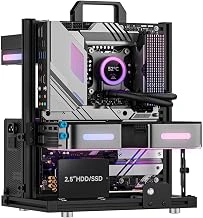
Aluminum Open Frame PC Test Bench for DIY and Server Rack Mount
Full ATX and micro-ATX builders who need accessible component testing or permanent open-air cooling will find this aluminum open frame test bench a practical option at $45.99. The frame accommodates standard motherboard form factors - ATX, micro-ATX, and Mini-ITX - through a universal tray design with pre-drilled standoff holes that align with industry-standard mounting patterns.
The open-frame construction removes side panels and airflow restrictions entirely, which helps components shed heat in high-load scenarios or during iterative build testing. Because every connector, expansion slot, and cable route remains exposed, swapping GPUs, troubleshooting RAM configurations, or replacing storage drives takes seconds rather than minutes. This layout works particularly well for system integrators, benchmarking setups, or anyone running components through extended burn-in cycles.
Rated at 4.2 out of 5 stars, the bench uses aluminum extrusion members that mate with T-slot profiles common in modular rig frames and multiple/multiple-style chassis projects. You can mount the assembly directly into an existing extrusion rig or use it as a standalone desktop test platform. Included mounting hardware covers motherboard standoffs, drive brackets, and frame fasteners, so you won't need to source additional T-nuts or screws for a typical build.
Weight capacity and structural rigidity handle full-size ATX boards with tower coolers, dual-slot graphics cards, and multiple larger drives without noticeable flex. The aluminum construction keeps total frame weight low enough for bench-to-bench portability while maintaining dimensional stability under load.
Mini-ITX builds fit without issue, but smaller boards leave unused standoff holes exposed across the tray. E-ATX motherboards exceed the tray's width, so extended-ATX projects require a different frame or custom fabrication. The open design also means dust settles directly on components; plan for regular compressed-air cleaning if the bench sits in a high-traffic or workshop environment. Because no panels enclose the hardware, keep the setup away from accidental contact, spills, or pets.
For builders integrating PC hardware into simulator cockpits, server racks, or modular aluminum frames, this test bench delivers motherboard compatibility, thermal access, and T-slot mounting in a straightforward package. The price point and universal tray layout make it a sensible middle option between bare-bones mounting plates and fully enclosed mini-ITX cases.
- ✅ Universal motherboard tray fits ATX, micro-ATX, and Mini-ITX with pre-drilled standoff holes
- ✅ Open-frame design removes airflow restrictions and speeds component access
- ✅ T-slot compatible aluminum extrusion integrates with modular rigs and 80/20 frames
- ✅ Included mounting hardware covers standoffs, drive brackets, and frame fasteners
- ✅ $45.99 price point balances cost and functionality for full-size builds
- ⚠️ E-ATX motherboards exceed tray width and require custom solutions
- ⚠️ Open construction exposes components to dust and accidental contact
- ⚠️ Mini-ITX boards leave unused standoff holes visible across the tray
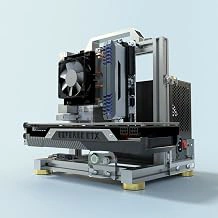
DIY Open Frame Aluminum PC Chassis
Adjustability defines this open-frame chassis kit. The extrusion-based design lets you reposition the motherboard tray, adjust expansion card spacing, and mount radiators at multiple angles without permanent drilling or fixed brackets. Every component location remains user-configurable through T-slot hardware, a sharp contrast to the fixed-geometry mounting of our overall pick.
The frame accommodates ATX, Micro-ATX, and Mini-ITX boards with equal ease. Vertical GPU mounting, dual-radiator loops, and multiple fan configurations all stay within reach because the T-slots run the full height and width of the frame. If you swap hardware frequently or plan water cooling with reservoir placement outside standard ATX zones, this flexibility removes the guesswork that fixed shelves impose.
Configuration freedom comes with assembly responsibility. You'll spend more time measuring standoff placement, squaring the frame, and aligning expansion slots than you would with a pre-drilled tray. The learning curve suits builders who value iterative tuning over plug-and-play installation. Cable management also demands more planning since routing paths change with every layout adjustment.
At $52.89, the chassis costs roughly the listed amount% more than simpler fixed-tray options. That premium makes sense for water cooling builds where radiator placement, pump location, and reservoir height vary by loop design. It also pays off in multi-GPU configurations where card spacing affects airflow and clearance. For single-configuration builds that won't change after initial assembly, the added cost and setup time offer little practical return.
The open-frame design exposes all components to dust and requires attention to electrical isolation between bare aluminum and grounded parts. Nylon washers and standoffs become essential rather than optional. If your sim rig shares space with heavy foot traffic or you prefer enclosed aesthetics, this chassis trades protection for access and adjustability for simplicity.
- ✅ Full T-slot adjustability for motherboard, GPU, and radiator placement
- ✅ Supports ATX, Micro-ATX, and Mini-ITX in the same frame
- ✅ Multi-radiator and custom loop configurations stay flexible
- ✅ Vertical GPU mounting and non-standard component spacing available
- ⚠️ Assembly requires careful measurement and alignment
- ⚠️ 60% price premium over fixed-tray alternatives
- ⚠️ Open frame exposes components to dust and requires electrical isolation hardware
- ⚠️ Cable routing demands more planning with each configuration change
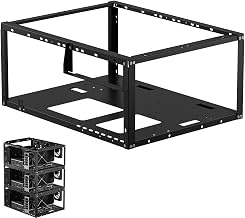
Stackable Open Frame PC Test Bench for Server Rack Mount
At $36.99 with a 4.8/5 rating, this stackable open frame test bench offers a straightforward budget entry for builders who need a single, fixed PC mount on aluminum extrusion without the flexibility of tool-free adjustment. The price sits well below the premium brackets commanded by units with indexed height tracks or magnetic retention, making it a practical choice when your build dimensions are already settled and you don't expect to swap motherboard form factors or relocate components frequently.
The stackable design stands out for users managing multiple systems on the same rig - secondary gaming PCs, spare hardware for testing, or dedicated streaming machines can share vertical rack space without buying entirely separate mounting solutions. If you're building a sim cockpit with both a primary ATX build and a spare mini-ITX for capture duties, stacking keeps both chassis accessible and cable runs tidy.
Tradeoffs center on adjustability and included hardware. While higher-priced shelves bundle slide nuts, T-nuts, and quick-release brackets, this frame assumes you'll source your own fasteners or already have extrusion hardware on hand. The open frame construction provides ventilation but lacks the tool-free repositioning found in indexed slot designs. For builders locking in a configuration and prioritizing cost over frequent changes, the reduced feature set is a fair exchange. Fixed setups - especially those in server rack contexts or static test benches - rarely need micro-adjustments once motherboard standoffs and drive bays are aligned.
This shelf fits budget-conscious builders, users mounting a secondary or backup PC, and anyone comfortable with basic extrusion fastening who values the stackable format over premium conveniences.
- ✅ Budget-friendly at $36.99
- ✅ Stackable design for multi-system or test bench setups
- ✅ Open frame construction provides excellent ventilation
- ✅ High rating of 4.8/5 indicates solid user satisfaction
- ⚠️ Limited adjustability compared to indexed or quick-release designs
- ⚠️ Mounting hardware not included - requires separate purchase or existing stock
- ⚠️ Fixed configuration means relocating components involves manual refastening
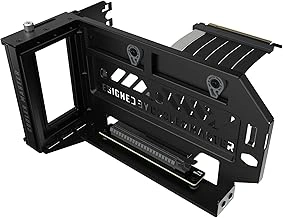
Cooler Master Vertical GPU Card Holder Kit V3
The Cooler Master Vertical GPU Card Holder Kit V3 is not a standalone PC mounting solution but can work alongside the shelves reviewed above to add vertical GPU positioning on aluminum profile rigs. This kit includes a mounting bracket and riser cable designed for cases with vertical GPU support, and with some adaptation it can attach to extruded aluminum frames when paired with an appropriate PC mounting shelf.
Compatibility depends on your shelf's layout and available mounting points. The bracket requires stable attachment to vertical aluminum profiles, and you'll need adequate clearance between the GPU and other components. The included riser cable determines signal quality, so verify your GPU and motherboard work reliably with PCIe riser connections before committing to a vertical mount setup.
At around $60, the kit adds flexibility for builders who want vertical GPU orientation in a custom chassis, but it requires careful planning. Measure your available vertical space, confirm the riser cable length matches your build, and ensure your shelf can support the combined weight of GPU and bracket without flexing. The 4.4 out of 5 rating reflects solid build quality, though installation on non-standard frames takes more effort than drop-in case mounting.
This accessory makes sense if you're already using one of the dedicated PC shelves and want to optimize airflow or aesthetics with a vertical GPU. It won't replace a full mounting shelf, and the added complexity means it's best suited for builders comfortable with custom metalwork or T-slot adapter plates.
- ✅ Adds vertical GPU mounting to aluminum profile builds when paired with a PC shelf
- ✅ Includes riser cable and mounting bracket
- ✅ Solid construction with 4.4/5 rating
- ⚠️ Requires existing PC mounting shelf and careful compatibility planning
- ⚠️ Installation on extruded aluminum frames needs custom adaptation
- ⚠️ Riser cable compatibility must be verified with your GPU and motherboard