We may earn a commission when you buy through links on this page, at no extra cost to you. How this works.
High-end sim racing rigs built on 80/20 aluminum extrusion present a unique cable routing challenge. The same T-slot channels that allow infinite adjustment also create dozens of pinch points where USB cables, power leads, and high-speed data lines from direct drive wheelbases can snag during seat or pedal repositioning. Left unmanaged, cables drape across moving parts, interfere with sliding mechanisms, and take stress directly on connectors every time you adjust your seating position.
Signal integrity becomes a real concern once cables exceed recommended bend radii or experience repeated flexing near connector bodies. Direct drive wheelbases transmit force feedback data at high frequency; any intermittent connection caused by cable strain shows up immediately as stuttering or dropout during a race. Power cables routed too close to data lines can introduce electrical noise, particularly when multiple peripherals share a single power strip mounted to the rig frame.
Beyond the functional risks, loose cables accumulate dust and create maintenance friction. Every time you need to swap a peripheral or troubleshoot a connection, you're fighting through a tangle instead of tracing a clean, labeled run. A purpose-built cable management system turns your rig into a platform where expansion and reconfiguration take minutes rather than hours, and where every connector remains accessible without stress on the cable or port.
The four kits in this guide address these structural and signal challenges with different trade-offs in installation complexity, adjustability, and material durability. Choosing the right system depends on how often you reconfigure your rig, how many devices you run, and whether you prioritize tool-free repositioning or permanent, low-profile routing.
Use the matching tool first
Start with Sim Rig Upgrade Path Planner if you want to narrow the fit before checking current offers.
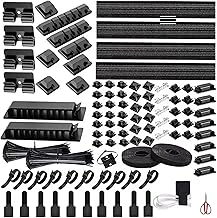
314-Piece Cord Organizer & Cable Management Kit for Desk & TV
The 314-piece kit approaches cable management through volume, packing adhesive clips, velcro wraps, cable sleeves, and zip ties into a single package. At $18.99, the question is whether the breadth of components solves routing challenges on an multiple/multiple sim racing rig or simply creates a drawer full of unused parts.
The kit includes multiple sizes of adhesive cable clips designed for flat surfaces - desk edges, monitor backs, and wall runs. These clips stick to smooth aluminum extrusion faces but won't grip inside T-slot channels without additional backing. If your chassis uses painted or anodized profiles with clean side panels, the adhesive clips anchor USB hubs, audio cables, and power bricks. Rough or textured extrusion finishes reduce bond strength, and clips loaded with thick cables may peel over time.
Cable sleeves in the kit handle bundling but lack the split-loom flexibility that makes routing easier around existing harnesses. You'll need to disconnect plugs to thread cables through, which adds friction during upgrades. Velcro straps work better for temporary runs - power supplies, transducer amps, and USB extension cables that change position as you adjust pedal plates or shift monitor mounts.
The variety creates decision fatigue. Sorting through fourteen clip sizes and three sleeve diameters to find the right piece mid-install interrupts workflow. Sim rigs benefit more from a focused set of T-slot-compatible components than a broad sampler. This kit works if you already know which clip size fits your cable diameter and where adhesive mounts make sense, but newcomers may struggle to match components to cockpit geometry.
Most of the multiple items suit office desks and home theater consoles better than aluminum racing chassis. The kit earns a 4.7/5 rating on Amazon, reflecting solid performance in traditional cable management roles. For sim racing, expect to use multiple% of the included components regularly, with the remainder serving as replacements or handling non-chassis tasks like routing cables behind your PC case.
Adhesive clips simplify runs along smooth extrusion faces and cockpit panels where drilling isn't practical. The kit's low cost makes it a reasonable backup option if you need a specific clip size immediately, but T-slot rail systems and split-loom sleeves deliver more consistent results on multiple/multiple frames.
- ✅ Large variety of clip sizes and cable management components
- ✅ Adhesive clips work on smooth aluminum extrusion faces and panels
- ✅ Velcro straps handle temporary or frequently adjusted cable runs
- ✅ Low cost provides backup options for multiple cable diameters
- ⚠️ Adhesive clips don't grip inside T-slot channels without backing
- ⚠️ Cable sleeves require disconnecting plugs to thread, slowing upgrades
- ⚠️ Broad component variety creates sorting and decision friction during install
- ⚠️ Most pieces better suited to desks and home theater than 80/20 chassis
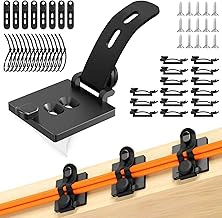
Kanemc Cable Clips Management Kit with Cord Ties & Straps
The Kanemc Cable Clips Management Kit sits at the budget end of the premium category at $11.99, combining adhesive clips with hook-and-loop cord ties and adjustable straps in a single package. The mix of fastening methods gives you flexibility to handle different cable types - clips for power leads that stay fixed, straps for bundles you might adjust when swapping peripherals.
The smaller component count compared to kits priced above multiple means you'll need to plan your routing carefully. A typical multiple/multiple sim rig with wheel base, pedals, shifter, and handbrake will consume most of the clips if you anchor every run individually. For cockpits with fewer accessories or cleaner factory harnesses, the focused selection avoids leftover clutter and speeds up the install process.
Adhesive durability matters when clips bear the weight of bundled USB and power cables during extended sessions. The Kanemc kit uses standard acrylic foam tape, which holds reliably on clean aluminum extrusions but may lift over time on powder-coated surfaces or in warm ambient conditions. Reusable Velcro straps offset this by allowing you to secure heavy bundles to fixed mounting points without relying solely on adhesive contact.
Installation becomes straightforward when you group cables by function - input devices on one side, display and audio on the other - then use clips for horizontal runs along extrusions and straps for vertical drops to the floor. The variety of fasteners lets you adapt to awkward angles around seat sliders and pedal decks without forcing every cable into the same attachment style.
The kit earns a 4.6/5 rating on Amazon, reflecting satisfaction from users who value the price-to-utility ratio but note the need for deliberate routing to avoid running short on clips mid-project. For sim racers building their first cockpit or maintaining a streamlined three-peripheral setup, the Kanemc kit delivers functional cable control without paying for excess components you won't deploy.
- ✅ Multiple fastener types handle different cable weights and routing angles
- ✅ Reusable Velcro straps allow adjustments when changing peripherals
- ✅ Focused component count speeds installation on streamlined rigs
- ✅ Price point suits first-time builders and budget-conscious upgrades
- ⚠️ Smaller clip count requires careful planning on multi-peripheral cockpits
- ⚠️ Adhesive may lift on powder-coated surfaces or in warm environments
- ⚠️ Heavy cable bundles can exceed individual clip load capacity
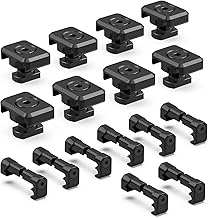
Pressure Switch Cable Management Kit for M-LOK/Picatinny Rail (16-Pack, Black)
Rail-mount cable clips designed for M-LOK and Picatinny firearms accessories adapt surprisingly well to multiple/multiple T-slot extrusions, though the fit requires careful alignment. This 16-pack uses a sliding nut mechanism that locks into parallel grooves, offering tool-free repositioning once installed - a useful feature when routing power supplies, USB hubs, and pedal cables during cockpit assembly. The clips grip round cables up to approximately the listed size in diameter and sit flush against the profile, keeping runs tight to the frame rather than protruding into legroom or sight lines.
The rail-specific mount provides noticeably firmer hold than adhesive-backed options, particularly in high-vibration environments where force feedback bases generate sustained movement. However, compatibility depends on your specific extrusion: standard multiple/multiple multiple-series and multiple-series profiles share similar slot geometry with M-LOK rails, while metric or non-standard profiles may require shims or adapters. Sixteen clips typically handle a single-monitor cockpit with wheel base, pedals, and shifter, though triple-screen setups or complex button-box installations will need additional packs. The black finish blends well with anodized aluminum frames, and the reusable mount design means you can adjust cable routing as your rig evolves without leaving adhesive residue or requiring new hardware.
- ✅ Tool-free repositioning after initial installation
- ✅ Firmer hold than adhesive solutions in high-vibration cockpits
- ✅ Reusable mounting hardware leaves no residue
- ✅ Black finish matches anodized aluminum profiles
- ⚠️ Requires careful alignment with T-slot geometry
- ⚠️ 16-pack may be insufficient for triple-screen or complex setups
- ⚠️ Non-standard extrusion profiles may need shims
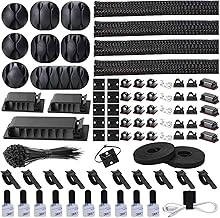
N NOROCME Cable Management Kit with Sleeves, Holders, Clips, Straps, and Ties
The N NOROCME kit centers on cable sleeves to group multiple wires into a single, flexible bundle. Each sleeve accommodates cables of varying diameters - thin USB and data lines alongside thicker power cables - making it straightforward to consolidate the mixed wire sizes typical on a sim racing rig. The included holders, clips, straps, and ties provide multiple attachment methods, letting you secure the sleeved bundle to your multiple/multiple frame or route it along a rig's underside without drilling.
Sleeve-based bundling delivers a cleaner visual than individual clip attachment when you have many cables running parallel paths. Threading wires into the sleeve takes more upfront time than snapping clips onto discrete cables, but the result hides individual wires and reduces the number of attachment points you need along the frame. You can open the sleeve's zipper or Velcro seam to add or remove a cable later, though this still requires more disassembly than simply unclipping a single wire from an adhesive mount.
The clips and straps in the kit work well on aluminum extrusion when you need to anchor the bundled sleeve at intervals or branch a single cable away from the main group. Adhesive holders stick to smooth painted surfaces on a rig chassis, but they may lift on textured powder coat unless you clean and prepare the surface. The variety of fasteners gives flexibility for different routing scenarios - vertical runs along a seat frame, horizontal paths under a pedal deck, or loops behind a monitor mount.
At $15.75, this kit suits builders who want to consolidate multiple cables into fewer visible runs and don't mind the extra threading step during initial setup. If you frequently swap peripherals or troubleshoot connections, a clip-only system offers faster access to individual wires. For a sim rig where cable paths are stable and visual tidiness is the priority, the sleeve approach reduces clutter more effectively than a collection of discrete clips.
- ✅ Sleeves accommodate mixed cable diameters in one bundle
- ✅ Multiple attachment methods for different frame surfaces
- ✅ Reduces visible wire count along rig frame
- ✅ Affordable at $15.75
- ⚠️ Threading sleeves takes longer than snap clips
- ⚠️ Adding or removing cables requires opening sleeve seam
- ⚠️ Adhesive holders may lift on textured powder coat
What to Look for in a Premium Cable Management Kit
Premium cable management for a sim racing rig starts with T-slot compatibility. Extruded aluminum chassis - whether 40×40 or 80/20 profile - need clips, brackets, or channels that fit directly into the grooves without drilling. Drop-in solutions let you reposition power cables, USB hubs, and pedal connectors as you upgrade wheels, monitors, or motion actuators.
Adhesive strength on powder-coated surfaces separates functional systems from garage-bin failures. Most aluminum cockpits arrive with a textured black or silver finish that rejects cheap acrylic tape within days. Look for industrial-grade VHB backing or silicone pads rated for metal surfaces and thermal cycling. If the clip claims tool-free installation but leaves residue or peels under tension, it will create more mess than it solves.
Adjustability matters when you swap hardware. A bundled sleeve system that locks cables into a single rigid path becomes a liability the moment you add a DD wheelbase, button box, or transducer amplifier. Modular clips, hook-and-loop straps, and segmented channels allow you to add or remove individual cables without tearing down the entire harness. Kits that offer multiple clip sizes and optional extenders adapt to thick power bricks, coiled USB cables, and shielded audio lines without forcing you to buy a second set.
Cable capacity defines real-world usability. A basic kit designed for monitor cables will not handle the diameter of a 15 A IEC power cord or the stiffness of a braided DisplayPort bundle. Check the interior diameter of sleeves, the throat width of clips, and the load rating of any adhesive mount. If your rig runs a direct-drive wheel, load-cell pedals, tactile transducers, and RGB peripherals, count every cable and measure the thickest one before you commit to a kit that maxes out at office-desk gauge.
Avoid single-use tape-and-zip-tie bundles that lock you into one layout. Permanent adhesive, non-reopening sleeves, and fixed-length ties force you to cut and replace every component when you adjust seat position or upgrade a peripheral. Premium systems use reusable fasteners, repositionable mounts, and segments that snap together without tools, so your cable plan evolves with your cockpit instead of fighting it.
The Final Verdict on Taming Your Rig's Cables
Choosing the right cable management kit depends on how you route power, USB, and video signals through your cockpit. If you run multiple peripherals - button boxes, shifters, handbrakes, and motion platforms - the 314-piece kit gives you enough clips, mounts, and ties to address every cable junction without guessing. Users with a single monitor and a direct-drive wheel will find the Kanemc kit sufficient for the essentials, keeping the frame clean without leftover hardware.
The rail-mount solution makes sense when you adjust seat position, pedal deck angle, or screen distance regularly. Sliding channels let you reposition bundles without peeling adhesive or cutting new zip ties. For builders who prefer a bundled sleeve approach that hides cables inside flexible tubing rather than clipping them to extrusion slots, the N NOROCME kit delivers the sleeves, connectors, and fasteners in one package.
Installation takes between ninety minutes and three hours depending on rig complexity, but that time investment protects connectors from tension and makes future upgrades or troubleshooting faster. A tidy chassis also reduces the risk of snagging cables when entering or exiting the seat, which can pull USB plugs loose or stress solder joints over time.
Tips for Planning Your Cable Routing on an 80/20 Chassis
- Map all cable paths before attaching any clips - identify conflict zones with seat sliders and pedal adjustment ranges
- Group cables by function: keep high-speed USB data lines separate from AC power to minimize EMI
- Leave 10-15cm of slack at every connection point to allow hardware repositioning without re-routing
- Route wheel base cables along the rear vertical upright, not under the deck where flex can stress connectors
- Test USB hub placement before final mounting - signal degradation increases beyond 3 meters on passive hubs
- Use adhesive clips on static frame sections, velcro straps on adjustment paths