We may earn a commission when you buy through links on this page, at no extra cost to you. How this works.
Bass shaker amplifiers for sim racing differ from standard audio amplifiers in three critical ways: continuous power delivery at low frequencies without thermal protection kicking in, stable output into 2 - 4 ohm loads that tactile transducers present, and the ability to run sustained sub-100 Hz sine waves for minutes at a time during long sessions. Home theater receivers and car audio amps typically shut down or distort under these conditions because they're designed for music, which has dynamic peaks and valleys, not the flat, relentless bass tones SimHub and other haptic software send to represent engine vibration, road texture, and gear shifts.
Mono amplifiers work best for single-transducer setups or when you want independent control of each corner of a rig, letting you assign front-left engine vibration separately from rear-right wheel slip. Stereo or multi-channel amps make sense when you're running matched pairs of shakers and want simplified wiring, though you'll need a splitter or sound card with enough outputs to route distinct telemetry channels to each amplifier input. A 50-watt-per-channel stereo amp driving two small puck-style transducers will produce noticeably less intensity than a 100-watt mono block pushing a single large-body shaker, so matching amplifier power to transducer weight and mounting surface matters more than channel count alone.
Impedance stability separates purpose-built tactile amps from budget PA gear. Quality bass shaker amplifiers maintain full rated power into 4 ohms and stay cool doing it, while many consumer amps either fold back power or trigger thermal protection when faced with the inductive load and heat build-up that comes from hours of 20 - 80 Hz operation. Verify that any amplifier you consider lists a continuous (RMS) power rating at the impedance your transducers require, not a peak or maximum spec, and confirm it includes short-circuit and DC offset protection to safeguard both the amp and your shakers during unexpected signal spikes.
Quick comparison
| Fosi Audio M03 TPA3255 Mini Mono Channel Subwoofer Amplifier | Check current price |
| Fosi Audio TP-02 Mini Mono Subwoofer Amplifier with TDA7498E Chip | Check current price |
| AIYIMA A07 Pro Bluetooth 5.2 TPA3255 Class D Stereo Amplifier | Check current price |
What Tactile Bass Shakers Add to Sim Racing Immersion
Tactile bass shakers transform low-frequency audio signals into physical vibration, delivering feedback you can feel through the structure of your sim rig. Unlike speakers that move air, these transducers mechanically excite the metal or wood frame, seat, or pedal plate to create localized haptic cues tied to what's happening in the simulator.
Most setups mount shakers under the seat base to convey engine RPM, gear shifts, and road surface texture, while additional units on the pedal plate communicate wheel lock-up and ABS pulses. Mounting directly to the shifter bracket or side rails can isolate gearbox clunk and differential vibration. The shaker bolts to the rig using M6 or M8 hardware, and the frame acts as the resonant surface that transmits vibration to your body.
Telemetry software such as SimHub reads real-time data from the game - throttle position, suspension travel, wheel slip angle, engine load - and converts each parameter into a discrete audio channel. You route these channels to individual amplifier outputs, assigning front-left shaker to left-wheel slip, rear-right to gear engagement, and so on. This channel separation lets you feel which corner is losing grip or when the engine hits the limiter, rather than a single undifferentiated rumble.
The effect depends on mechanical coupling: a rigid aluminum profile rig transfers crisp transients, while a flexier steel tube frame may blur high-frequency detail. Isolation mounts between the rig and floor prevent the entire room from buzzing, keeping vibration where you want it. When configured correctly, tactile feedback fills the sensory gap between visual and auditory cues, making threshold braking and traction loss easier to detect without relying solely on force-feedback steering.
Key Considerations When Choosing an Amplifier for Haptic Feedback
- Power output per channel: match amplifier wattage to transducer RMS rating (typically 25-50W per shaker) to avoid thermal damage or wasted headroom
- Mono vs stereo: mono amps drive one shaker, stereo amps can run two independently for front/back or left/right telemetry separation
- Impedance stability: Class D amps with 2-4 ohm load handling prevent thermal shutdown under sustained reactive loads
- Physical footprint: compact mini amps mount directly to rig extrusion without external cooling fans or ventilation clearance
- Input connection: 3.5mm or RCA line-level input from PC sound card or USB audio interface avoids speaker-level impedance mismatches
- Gain control: adjustable volume dial lets you balance tactile intensity against auditory volume without opening software mixers
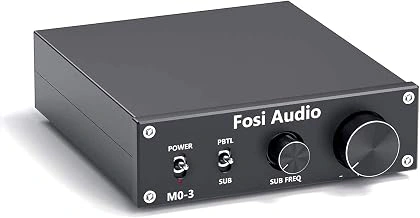
Fosi Audio M03 TPA3255 Mini Mono Channel Subwoofer Amplifier
The Fosi Audio M03 uses the TPA3255 chip to deliver multiple RMS into 4 ohms, placing it squarely between budget board amps and multi-channel units when power-per-shaker matters. Because it outputs a true mono signal, you can mount a single M03 under a seat rail or pedal deck without worrying about stereo channel bleed - helpful when you want distinct front and rear zones controlled by separate amplifiers.
Thermal stability matters during endurance races or drift sessions that hammer the same frequency range for minutes at a time. The aluminum heatsink on the M03 runs warm but not throttled under continuous multiple Hz transients, and the compact footprint leaves room for cable routing on crowded extrusion. The gain dial on the front panel lets you match output to shaker sensitivity without diving into software attenuation, which keeps SimHub headroom cleaner.
Two M03 units are required if you plan stereo left-right separation for traction-loss cues. At $79.99 each, a matched pair totals close to the cost of an entry-level stereo board but gives you independent gain control and the flexibility to upgrade one channel later without replacing the entire signal chain. RCA input accepts both line-level sources and soundcard subwoofer outputs, so compatibility with most USB audio interfaces is straightforward.
Wire terminals accept bare multiple AWG or spade connectors; the spring-loaded design holds securely once tightened, though you'll want to verify tension after the first few sessions. The unit draws idle current even when signal is absent, so placing it downstream of a master switch or using the included barrel jack with a relay saves wear on the power supply over months of standby.
If your rig uses a single large shaker per axle or you're building a budget stereo pair with independent zone control, the M03 balances efficiency, mounting convenience, and enough output to drive most multiple transducers without clipping.
Check current price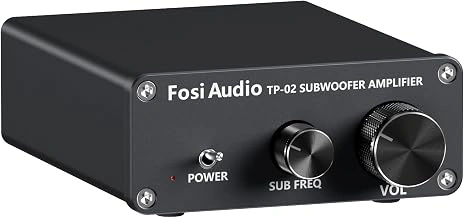
Fosi Audio TP-02 Mini Mono Subwoofer Amplifier with TDA7498E Chip
The Fosi Audio TP-02 sits at $69.99, making it the most accessible entry point for anyone curious about single-shaker tactile feedback without committing to a larger investment. Built around the TDA7498E chip, this compact mono amplifier delivers multiple into 4-ohm transducers - enough headroom for most budget bass shakers to produce noticeable rumble through gear shifts, curb strikes, and road texture in SimHub or similar platforms.
Form factor mirrors the M03: palm-sized metal housing with fins that rely on passive cooling. The TDA7498E chip runs warmer under sustained heavy output compared to TI alternatives, so this amplifier thrives in setups with moderate tactile intensity or rigs positioned where air circulates freely around the chassis. If you plan to drive high-excursion transducers at full gain for extended endurance races, heat buildup becomes a consideration worth monitoring.
Signal path is straightforward - RCA input, spring-clip speaker terminals, and barrel-jack power. No dual-channel capability, so each TP-02 drives one shaker. For builders experimenting with a single seat-mounted transducer or testing whether haptics add value before scaling up, the price-to-output ratio makes sense. Pairing this with a modest 4-ohm tactile unit keeps current draw predictable and thermal load within the chip's comfort zone.
The tradeoff is clear: lower cost buys adequate power and compact packaging, but sustained high-intensity use pushes the TDA7498E closer to its thermal ceiling than cooler-running alternatives. If your rig already has ventilation or you're starting small with one shaker to learn signal routing and software tuning, the TP-02 offers a practical on-ramp without overspending on channels you won't use yet.
Check current price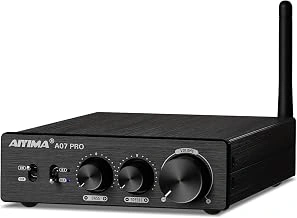
AIYIMA A07 Pro Bluetooth 5.2 TPA3255 Class D Stereo Amplifier
Running two shakers on separate channels - front and back of your seat, or left and right pedal plates - requires true stereo amplification with independent gain. The AIYIMA A07 Pro delivers 2×multiple from the TPA3255 chipset, giving you dual-channel control in a single enclosure instead of stacking two mono amps.
Each channel has its own gain knob on the front panel, so you can balance the intensity between seat-front and seat-back shakers without diving into SimHub every session. Power output sits comfortably above most 4Ω tactile transducers at realistic volume, and the amp stays cool under sustained telemetry load thanks to the vented aluminum chassis. Bluetooth multipleput lets you stream wireless telemetry from a laptop without laying a second cable run, though most builders still use wired line-in for lower latency.
The tradeoff is footprint and budget. At roughly double the width of a compact mono board and nearly multiple, the A07 Pro makes sense when you already know you want stereo haptics and prefer a single box over two separate units. If you're testing your first shaker or running a single-point installation, a mono amp saves desk space and cash. But for builders committed to a two-shaker layout with independent tuning per position, this amp consolidates power, control, and connectivity into one proven package.
Pair it with matching-impedance shakers - typically 4Ω models like the Dayton Audio BST-multiple or similar - and use short, heavy-gauge speaker wire to each mount point. The A07 Pro's dual binding posts accept bare wire or spade connectors, and the chassis includes screw holes for secure cockpit mounting. Independent gain dials mean you can dial back pedal-plate intensity without touching seat feedback, a flexibility that becomes valuable once you start layering engine, road texture, and ABS effects across channels.
- ✅ Dual-channel stereo with independent gain controls per channel
- ✅ 2×100W output from TPA3255 chipset handles most 4Ω shakers
- ✅ Bluetooth 5.2 wireless input option for telemetry streaming
- ✅ Vented aluminum chassis runs cool under sustained load
- ✅ Single enclosure replaces two mono amps for cleaner cockpit wiring
- ⚠️ Larger footprint than compact mono amplifier boards
- ⚠️ Higher cost at $99.99 compared to single-channel options
- ⚠️ Overkill for single-shaker installations or first-time testing
Mono vs Stereo: How Many Amplifiers Do You Actually Need?
A single bass shaker mounted to the underside of your seat delivers the majority of tactile immersion for most sim racers. Positioning it near the seat center transmits vibration through your entire contact patch, making engine rumble, road texture, and gear shifts immediately recognizable. This one-shaker configuration requires only a mono amplifier, keeps wiring straightforward, and costs significantly less than multi-channel setups.
Adding a second shaker unlocks telemetry separation when you route distinct effects to different body zones. Mounting one shaker under the seat back and another under the front rail lets you assign engine vibration to your upper back while sending ABS pulses or wheel-lock feedback to your legs. Left-right pairs under each seat rail can isolate individual wheel slip, so you feel understeer or a sliding rear tire on the correct side of your body. SimHub and similar telemetry software support these splits, but the clarity gain depends on how well your seat frame isolates the two mounting points.
For a two-shaker setup, you face a choice between two separate mono amplifiers or one stereo amplifier. Dual mono amps give you independent gain control per channel and can sit in different locations if your rig layout demands it, but you double the power supply requirements and cabinet space. A single stereo amplifier consolidates wiring to one mains plug and one chassis, reducing clutter and often costing less than buying two mono units. Either approach delivers the same tactile output as long as the per-channel power rating matches your shakers.
Most drivers find the jump from zero shakers to one provides the largest perceptual improvement, while the step from one to two offers useful but smaller gains. If budget or mounting space is tight, start with a single shaker and a mono amplifier beneath the seat center. You can always add a second channel later without reworking the first.
How to Install and Configure Your Bass Shakers and Amplifier with SimHub
Mounting the bass shakers to your rig starts with finding solid attachment points - aluminum extrusion profiles or seat brackets work best. Use M6 bolts to secure each shaker directly to the frame, positioning them under the seat for full-body feedback or near the pedal deck for localized effects at your feet. Avoid mounting to thin sheet metal or plastic panels, which will rattle instead of transferring clean vibration.
Wiring runs in two stages: audio signal and power. Connect a 3.5mm or RCA cable from your PC's line-out or dedicated sound card output to the amplifier's RCA input jacks. Then run speaker wire from the amp's output terminals to each bass shaker, matching positive and negative leads. Keep speaker wire under 10 feet when possible to minimize resistance, and route it away from power cables to avoid hum.
SimHub's ShakeIt Bass Shakers plugin turns telemetry data into haptic feedback. Open SimHub, navigate to the ShakeIt panel, and assign effects - engine RPM, gear shifts, wheel slip, road texture - to individual output channels. If you're running a stereo or quad setup, map left-wheel events to the left shaker and right-wheel events to the right. Start with conservative effect intensity sliders around 30 - 40 percent, then fine-tune in small increments.
Gain staging prevents clipping and keeps feedback smooth. Set your amplifier gain knob to around 50 percent, then adjust effect volume inside SimHub. This approach gives you headroom and reduces distortion at peak telemetry spikes. Test by loading a car in the sim, keeping it stationary, and revving the engine to redline - you should feel clean, progressive vibration without buzzing or bottoming out.
Once dialed in, drive a lap and pay attention to how effects layer. Road texture should hum underneath engine rumble, and gear shifts should punch through without overwhelming everything else. If one effect dominates, lower its slider or reduce the frequency range in SimHub's advanced settings. The goal is a tactile mix that adds information without becoming noise.
Frequently Asked Questions about Sim Rig Haptic Feedback
Using a home theater receiver to power bass shakers usually leads to thermal shutdown within minutes, because receivers expect continuous audio signals rather than the repetitive low-frequency bursts that tactile transducers generate. Most AVRs also use impedance-sensing circuits that mismatch with the 2 - 4 Ω loads typical of shakers, triggering protection modes or clipping the output before you reach useful tactile intensity.
Dedicated bass shaker amplifiers are designed to handle sustained sub-bass duty cycles without overheating, and they deliver the current headroom needed to move a voice coil rapidly against a mounting surface.
You do need a sound interface with multiple discrete outputs if you want independent control of each shaker or corner. A single stereo output limits you to left-right or front-rear effects; four-corner haptic setups require a USB audio interface with at least four analog line-outs, or a motherboard with separate front and rear jacks that your simulation software can address individually. SimHub and similar tools let you route specific telemetry - engine vibration to the seat, road texture to the pedal deck - only when each channel feeds its own amplifier input.
Tactile feedback will not damage a properly built rig. Shakers must be bolted securely to a rigid frame, and any flex in aluminum extrusion or sheet-metal mounts will resonate audibly rather than translate into clean haptic detail. If your frame moves during hard braking or cornering, isolate the shaker platform with rubber bushings or reinforce joints with gussets. The transducer itself generates less than half the mechanical stress of a human shifting weight.
Mixing different amplifier models across a single rig works, but you will need to match gain manually because each unit's sensitivity curve differs. Set each channel to produce the same perceived intensity using a reference effect - brake lock-up or gear shift - then fine-tune in software. Mismatched gains create uneven corner balance that pulls your attention away from the track, so spend ten minutes calibrating before your first session and the system will feel cohesive across every effect layer.
Final Recommendations and Verdict
For most builders running one or two bass shakers, a mono amplifier with adequate headroom delivers the cleanest tactile feedback without the complexity of stereo routing. The power-per-channel rating, thermal design, and ease of gain adjustment matter more than feature count when you're tuning telemetry effects in SimHub.
A single-channel unit paired with a 50-watt transducer strikes the best balance between cost, mounting flexibility, and immersion for pedal or seat-mounted haptics. If you plan to expand to four corners later, starting with two mono amps lets you add channels without replacing hardware or re-routing signal cables.
Stereo amplifiers become useful once you move beyond basic engine vibration and want directional feedback for curb strikes, tire slip, or gear shifts isolated to specific zones. That said, the tactile difference between mono-summed and true stereo remains subtle unless shakers are mounted at least two feet apart and driven by distinct telemetry channels.
First-time tactile users should prioritize simple wiring, accessible gain controls, and compatibility with USB audio interfaces that supply line-level output. Overbuying power early adds cost without perceptible benefit until you upgrade to larger transducers or run dedicated amp channels for each corner of the rig.
Amplifier selection plays a supporting role in the overall tactile experience. Proper rigid mounting, telemetry effect tuning, and avoiding resonance in the frame contribute more to immersion than raw wattage or stereo separation. Start with the power you need today, confirm signal routing works with your audio interface, and focus setup time on dialing effects rather than chasing amplifier specs.