We may earn a commission when you buy through links on this page, at no extra cost to you. How this works.
Running multiple USB peripherals in a sim cockpit - direct drive wheelbases, load cell pedals, button boxes, and handbrakes - exposes a problem that passive extension cables can't solve: signal degradation beyond fifteen feet. As distance increases, voltage drop and electromagnetic interference accumulate, causing intermittent disconnects, input lag, and dropped frames during races or flights where precision matters most.
Passive USB cables rely entirely on the host port's power and signaling. Stretch them past the USB specification's limit, and high-polling-rate devices start to stutter or vanish from device manager mid-session. Active USB extension cables embed a powered repeater chip inside the cable or an inline enclosure, regenerating both data signals and power delivery to maintain stable communication across distances that would otherwise fail.
We evaluated five active USB extension cables across lengths from 33 to 65 feet, testing compatibility with USB 2.0 and USB 3.0 peripherals common in sim rigs. Each cable was routed through aluminum profile cockpits and connected to devices with polling rates up to 1,000 Hz. Our focus remained on real-world attributes: consistent device enumeration, sustained data throughput under load, connector fit in tight mounting brackets, and cable jacket durability during repeated flexing and repositioning.
All five options eliminate the dropout problem that passive cables create, but they differ in maximum length, USB version support, power delivery overhead, and physical construction. Understanding these trade-offs helps you match cable bandwidth to your specific device mix and cockpit layout without over-specifying or leaving performance on the table.
Quick comparison
| 33ft USB 3.0 Active Extension Cable with Signal Booster | Check price and availability |
| 50FT Active USB 2.0 Male to Female Extension Cable with Signal Booster | Check price and availability |
| 50FT Active USB 2.0 Male to Female Extension Cable with Built-in Signal Booster | Check price and availability |
What Is an Active USB Extension Cable and How Does It Work?
Active USB extension cables solve a problem that passive cables cannot: maintaining clean signal integrity over distances beyond 16 feet. When you route cables from a PC under your desk to a direct-drive wheel base mounted two meters away, or run a line to pedals at the far end of a cockpit frame, voltage drop and electromagnetic interference degrade the differential data pairs that carry USB communication. An active cable embeds a small repeater chip - usually located in a bulge near the host-side connector - that regenerates the signal halfway through the run, restoring both voltage and timing margins before transmission errors accumulate.
The repeater draws power directly from the USB bus in most designs, typically pulling 100 - 150 mA at 5 V. Higher-end active cables add a barrel jack or second USB-A plug for external power, which keeps the chipset stable when connecting high-current devices such as force-feedback wheel bases that already draw close to the 500 mA USB 2.0 limit. Because the amplifier works in one direction only, active cables are directional: the male Type-A end plugs into your PC or hub, and the female Type-A end accepts your peripheral. Reversing the ends will yield no link at all.
Most sim racing peripherals - wheels, pedal load cells, shifters, and button boxes - communicate over USB 2.0 at 480 Mbps or less. An active USB 2.0 cable is sufficient for these devices and often costs less than a USB 3.0 equivalent. Active USB 3.0 cables add four extra differential pairs and support 5 Gbps, which matters if you plan to hang a webcam for telemetry streaming or a capture device off the same extension. The additional lanes require more complex repeater logic, so USB 3.0 active cables typically show a larger inline module and draw slightly more current.
One important limitation: you cannot daisy-chain two active cables end-to-end without placing a powered USB hub between them. Each repeater chip expects to see a host controller on the upstream side and a device on the downstream side; connecting two repeaters in series confuses the enumeration handshake and usually results in an unknown-device error in Windows. If your cockpit layout demands more than 50 feet, insert a hub with its own power supply at the midpoint and treat each segment as a separate active extension.
When Active Extensions Still Drop Signal
Active cables solve most signal dropout issues, but a few edge cases push beyond their design limits. The most common culprit is bus power demand: USB 2.0 ports supply up to 500 mA per device, and USB 3.0 provides 900 mA. When you daisy-chain peripherals - direct drive wheel base, pedal load cell controller, button box, and shifter - off a single port or hub, aggregate current draw can exceed what the cable's repeater chip can pass through, causing intermittent disconnections even with a quality active cable.
Electromagnetic interference from direct drive motor controllers and wheelbase power supplies also disrupts signal integrity. High-current switching PSUs radiate RF noise that couples into nearby USB cables, especially those with inadequate shielding. If your active cable runs parallel to the motor power cable for more than a few inches, you may see random device resets or stutter during high-torque maneuvers.
Active cables have a maximum repeater range - typically the rated length plus one additional passive segment. Attempting to chain two 33-foot active cables together rarely works because the second repeater cannot reliably regenerate an already-degraded signal. USB specification limits total cable length to 5 meters for passive high-speed connections; active cables extend that, but they do not reset the signal chain completely.
A powered USB hub is the next escalation step. Unlike bus-powered hubs, a powered hub draws from its own AC adapter and supplies dedicated current to each port, isolating device power budgets. It also regenerates the USB signal at the hub's controller, effectively restarting the cable length budget. Mount the hub mid-cockpit, run one active cable from PC to hub, then short passive cables from hub to each peripheral. This topology keeps all devices within spec and prevents voltage sag.
Older motherboards with shared USB controller bandwidth present another this product. A single USB 2.0 controller may service eight physical ports but share one 480 Mbps upstream link. When multiple high-polling-rate devices - 1000 Hz wheel, load cell pedals, and tactile transducer controller - compete for that bandwidth, the controller queues packets and introduces latency or drops frames, regardless of cable quality. Check your motherboard's USB topology in device manager; spreading devices across controllers on different internal headers reduces contention.
For rigs with persistent RF interference, add snap-on ferrite cores to both ends of the USB cable near the connectors. Ferrite attenuates high-frequency noise above 10 MHz without affecting USB data rates. Position one core within six inches of the wheelbase connector and another near the PC port, especially if the motor driver's power supply lacks adequate output filtering. This passive fix costs a few dollars and often eliminates the random disconnects that occur only during aggressive force feedback spikes.
Conclusion
Signal dropouts in a sim cockpit trace back to one root cause: passive USB cables can't maintain clean data transmission beyond fifteen feet, especially under the constant electrical noise from direct drive motors and high-frequency pedal inputs. Active USB extension cables solve this by embedding signal boosters directly into the cable, regenerating the data stream before it degrades. The five products covered here all use that same fundamental approach, but they differ in speed standard, length, and build quality.
The 33-foot USB 3.0 option delivers the best balance for most rigs - enough reach for rear-mounted button boxes or handbrakes without excess slack, and 5 Gbps bandwidth that accommodates current and future peripherals. If your cockpit stretches past forty feet or you're working within a tight budget, the 50- and 65-foot USB 2.0 models provide stable connections for wheels, pedals, and shifters that don't require USB 3.0 speeds. The CableCreation USB 3.0 cable stands out as the most affordable entry into active 3.0 technology, making it a practical choice if you want future compatibility without premium pricing.
Every cable in this guide handles signal integrity through embedded active repeater chips, so your choice comes down to length requirements and speed standard. Measure your cockpit from PC to the farthest peripheral, then add ten percent for routing flexibility and strain relief loops. A 33-foot cable that runs taut will fail sooner than a 50-foot cable with proper service loops at connection points.
Cable management deserves as much attention as the active circuitry itself. Secure runs with Velcro straps rather than zip ties to allow repositioning, avoid sharp bends near connectors, and leave a small service loop at each end to absorb movement when you adjust your seat or pedal position. Active signal boosting prevents electrical dropout, but mechanical stress on the connectors will still cause intermittent faults over time. Route cables away from power supplies and motor housings where possible, and check connector seating every few months as part of your regular rig maintenance.
How to Choose the Right Cable: A Sim Racer's Buying Guide
- Measure exact distance from PC USB port to farthest cockpit peripheral with 10% length buffer for routing around frame obstacles and strain relief loops
- Identify bandwidth requirement: USB 2.0 handles all current sim racing gear; USB 3.0 adds headroom for future high-speed devices
- Verify signal booster location on cable: mid-cable boosters offer better performance than connector-integrated designs on runs over 50 feet
- Check connector orientation: active cables are directional, male end must connect to PC host port, female end to device or chain
- Plan cable routing path: avoid sharp bends under 2-inch radius that stress internal wiring and signal integrity
- Account for cockpit movement: motion platforms and sliding seat rails need service loops to prevent cable tension and connector fatigue
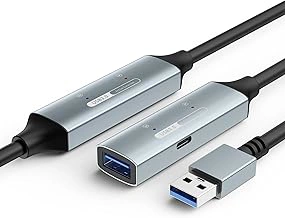
33ft USB 3.0 Active Extension Cable with Signal Booster
Most sim cockpit builders need a cable long enough to span the room without coiling excess underneath the rig. The 33ft USB 3.0 Active Extension Cable with Signal Booster delivers practical reach for spare-room or basement setups where the PC tower sits across the space from the wheelbase and pedals.
This cable uses an integrated signal booster to maintain stable data throughput across the full the listed size. USB 3.0 provides 5Gbps bandwidth while remaining fully backward-compatible with USB multiple peripherals - steering wheels, pedal sets, and button boxes connect without configuration changes. The thicker gauge wire and additional shielding reduce electromagnetic interference, a common issue when multiple power supplies and motor controllers share the same cockpit frame.
At $24.13, this option sits between budget USB multiple cables and premium multiple+ foot runs, offering mid-tier pricing for the length and bandwidth most cockpit layouts require. The cable's 4.6/5 rating reflects consistent reliability reports from users running direct drive wheelbases and load cell pedals over extended sessions.
The tradeoff comes in cable stiffness: USB 3.0 construction makes tight-radius bends more difficult compared to thinner USB multiple cables. Plan routing paths with gradual curves along the cockpit frame rather than sharp corners behind the seat mount. Velcro straps work better than zip ties for securing the cable without pinching the outer jacket.
This length handles typical room distances without the weight and bulk of multiple or longer cables. If your PC and rig share the same wall or corner, a shorter longer option may reduce clutter; if you're routing across a large dedicated sim room or through conduit, step up to a longer active cable. For standard spare-room cockpits, the listed size provides the clearance you need with bandwidth headroom for USB 3.0 peripherals down the road.
- ✅ 33-foot length covers most spare-room and basement cockpit layouts without excess cable
- ✅ USB 3.0 backward compatibility works with all USB 2.0 sim peripherals while offering 5Gbps bandwidth
- ✅ Integrated signal booster maintains stable data across full cable length
- ✅ Thicker gauge wire and shielding reduce electromagnetic interference in multi-device cockpits
- ✅ $24.13 price point delivers mid-tier value for the length and bandwidth
- ⚠️ Stiffer USB 3.0 construction makes tight-radius bends more difficult than thinner USB 2.0 cables
- ⚠️ Requires gradual routing curves and careful cable management around cockpit frames
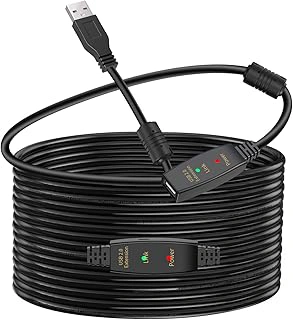
50FT Active USB 2.0 Male to Female Extension Cable with Signal Booster
Cockpits positioned across the room from the PC tower - or in a separate dedicated space - need cable runs that standard passive extensions can't support. This 50-foot active USB 2.0 extension cable solves that distance problem with an integrated signal booster that maintains stable data flow even at the limits of typical home and office layouts.
The USB 2.0 specification delivers up to multipleMbps throughput, which remains sufficient for every current sim racing peripheral: direct drive wheelbases, load cell pedal sets, button boxes, and shifters all operate comfortably within that bandwidth ceiling. Because USB 2.0 cables use fewer internal conductors than USB multiple equivalents, the jacket stays more pliable, making it easier to route through tight cockpit channels, around corners, and along 50FT Active USB 2.0 Male to Female Extension Cable with Signal Booster without the stiffness that fights your cable management.
At $20.79, this cable costs significantly less than comparable-length USB multiple active options while delivering identical performance for sim hardware that doesn't require SuperSpeed transfer rates. The 4.2 out of 5 rating reflects the reality that longer cables face greater vulnerability during installation: sharp bends near connectors, pinch points where the cable crosses door thresholds, and strain from being pulled taut across long spans all increase the chance of physical damage. Plan your routing path carefully, use adhesive clips or velcro straps every three to four feet, and leave a small service loop at both ends to absorb any tension.
The flexibility that makes this cable easy to route also means you need deliberate strain relief at the connectors. Secure the cable within six inches of each plug using a zip tie anchor point or cable saddle attached to your cockpit frame and PC case. This helps reduce the chance of the weight of the suspended cable from gradually loosening the USB connection or stressing the solder joints inside the plug housing.
For corner-office setups or dedicated sim rooms where your rig sits the listed size from the tower, this cable handles the distance without signal degradation while remaining easier to install than stiffer, more expensive alternatives.
- ✅ 50-foot length covers long room spans and separate-room layouts
- ✅ USB 2.0 provides sufficient bandwidth for all sim racing peripherals
- ✅ More pliable than USB 3.0 cables, easier to route through tight spaces
- ✅ $20.79 price point undercuts longer USB 3.0 active options
- ⚠️ Longer cable length increases vulnerability to physical damage during routing
- ⚠️ Requires careful strain relief at connectors to prevent tension damage
- ⚠️ Flexibility demands deliberate cable management to avoid pinch points
50FT Active USB 2.0 Male to Female Extension Cable with Built-in Signal Booster
At $21.59, this 50-foot active USB 2.0 extension cable delivers dependable signal boosting without the higher cost of premium alternatives. The built-in signal booster maintains stable data transmission across the full length, and the 4.3 out of 5 rating reflects consistent performance in real-world use. For sim racing gear - wheelbase telemetry, load cell pedals, and button boxes - USB 2.0's multipleMbps bandwidth is more than adequate, since even high-resolution pedal sensors and wheel inputs rarely exceed multipleMbps sustained throughput.
The integrated booster reduces the need for an external power adapter, keeping your cockpit setup cleaner and reducing points of failure. You plug the male end into your PC, route the cable to your gear, and connect devices to the female port without hunting for an outlet or managing a separate brick. Signal integrity remains solid whether you're transmitting force feedback telemetry or polling button-box inputs at multipleHz.
The tradeoff for the lower price appears in build quality: the cable jacket is noticeably thinner than competing models in the multiple range, and the strain relief at both connectors uses simpler molded rubber rather than reinforced flex boots. This construction works well in permanent installations where the cable stays routed along cockpit channels or under carpet, but frequent unplugging or repositioning will stress the connectors faster than heavier-duty options.
If you're mounting pedals, a shifter, and a button box in fixed positions and running cables once during initial cockpit assembly, the savings here fund other upgrades - better pedal springs, additional tactile transducers, or a USB hub with individual port switches. The signal performance matches pricier cables in stationary use; you're simply giving up durability for setups that get reconfigured weekly or travel to LAN events.
- ✅ Budget-friendly $21.59 price point for 50-foot active extension
- ✅ Built-in signal booster removes need for external power adapter
- ✅ USB 2.0 bandwidth sufficient for all standard sim racing peripherals
- ✅ 4.3/5 rating demonstrates reliable signal transmission in typical use
- ⚠️ Thinner cable jacket less durable than premium alternatives
- ⚠️ Simpler strain relief at connectors less robust under repeated flex
- ⚠️ Better suited to permanent installations than frequent reconfiguration
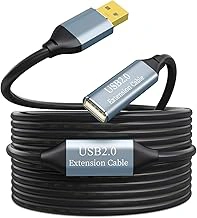
65FT Active USB 2.0 Type A Male to Female Extension Cable with Signal Booster
Sim racers building in dedicated rooms, garages, or commercial installations often face distances that exceed typical cable limits. This 65-foot active USB 2.0 extension addresses that challenge with integrated signal regeneration hardware that maintains stable data flow across the full length. The built-in booster actively amplifies the signal midway through the run, enabling reliable connectivity for direct drive wheels, load cell pedals, and button boxes even when your PC sits in a separate climate-controlled space or noise-isolated enclosure.
The cable uses USB 2.0 specification intentionally - while slower than USB multiple raw bandwidth, the reduced data rate experiences less signal degradation over long distances. For sim racing peripherals that rarely exceed USB 2.0 speed requirements, this design choice improves stability rather than limiting performance. The 4.5/5 rating reflects consistent performance across the maximum 65-foot span, showing the signal booster delivers the amplification needed to helps reduce the chance of the dropouts common in passive cables at this length.
At $20.79, the cost per foot becomes remarkably efficient for extreme-distance installations. The price advantage matters when positioning a cockpit for optimal monitor viewing angles, motion platform clearance, or customer flow in commercial facilities. You gain layout flexibility without the complexity or expense of USB hubs, repeater boxes, or fiber-optic converter systems.
Handling characteristics shift noticeably at this length. The cable carries more weight and stiffness than shorter extensions, creating sag between mounting points and placing stress on connectors if left unsupported. Plan for wall clips, cable trays, or adhesive guides every six to eight feet along the run. Secure both the male and female ends to helps reduce the chance of torque on the ports - USB Type A connectors aren't designed to support hanging cable weight. Route the cable along 65FT Active USB 2.0 Type A Male to Female Extension Cable with Signal Booster, under flooring, or through conduit rather than across open floor space where foot traffic or chair casters create snag and trip risks.
The extra length requires thoughtful installation, but for setups where PC-to-cockpit distance exceeds the listed size, this cable reduces the need for intermediate hardware or compromised rig placement. If your layout demands maximum reach and your peripherals operate within USB 2.0 bandwidth, this extension provides the range with consistent signal integrity.
- ✅ 65-foot length handles extreme cockpit-to-PC distances in dedicated sim rooms and commercial installations
- ✅ Active signal booster maintains stable connectivity across full cable run
- ✅ USB 2.0 spec reduces signal degradation risk over long distances
- ✅ $20.79 price offers strong value for maximum-length extension capability
- ⚠️ Increased cable weight and stiffness require mounting points every 6-8 feet to prevent sag
- ⚠️ USB 2.0 bandwidth limits future compatibility with higher-speed peripherals
- ⚠️ Length adds routing complexity in multi-user or high-traffic environments
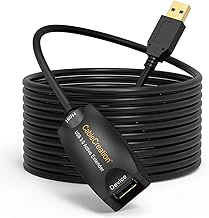
CableCreation Active USB 3.0 Extension Cable with Signal Booster
The CableCreation Active USB 3.0 Extension Cable delivers 5Gbps bandwidth at $18.99, making it the most affordable USB 3.0 option for sim cockpit builders who want headroom for future peripherals without stretching their budget. The integrated signal booster maintains stable data transfer across the cable length, and its 4.5/5 rating reflects consistent performance in PC enthusiast setups.
USB 3.0 bandwidth matters when you plan to expand beyond wheel bases and pedals. VR tracking cameras, capture devices for streaming, and USB display adapters all benefit from the extra throughput that USB 3.0 provides over USB multiple. If you're building a rig that might eventually include streaming equipment or additional USB-powered displays, this cable gives you the bandwidth ceiling you'll need without forcing you to upgrade later.
The cable runs shorter than the multiple- and longer options elsewhere in this list, but for most single-monitor or triple-screen cockpits with the PC tower positioned within the listed size, the length works fine. CableCreation has built a reputation in the PC modding and enthusiast community for solid connector molding and durable cable jackets, and this extension reflects that attention to build quality. The connectors seat firmly without wobble, and the cable jacket resists kinking during installation.
This extension makes sense for builders who anticipate adding bandwidth-intensive peripherals or who simply want the peace of mind that comes with USB 3.0 headroom. If your current gear - wheel base, pedal set, button box - already runs reliably on USB multiple and you have no plans to add cameras, capture hardware, or USB displays, you can save a few dollars with a USB multiple active cable. But if ecosystem expansion is on your roadmap, the $18.99 entry point for USB 3.0 speeds is hard to beat.
- ✅ Lowest-priced USB 3.0 active extension at $18.99
- ✅ 5Gbps bandwidth accommodates future high-throughput peripherals
- ✅ Solid connector molding and durable cable jacket
- ✅ 4.5/5 rating confirms reliable performance
- ⚠️ Shorter length compared to 50- and 65-foot options in this roundup
- ⚠️ USB 3.0 speed unnecessary if you only run basic sim peripherals with no expansion plans